

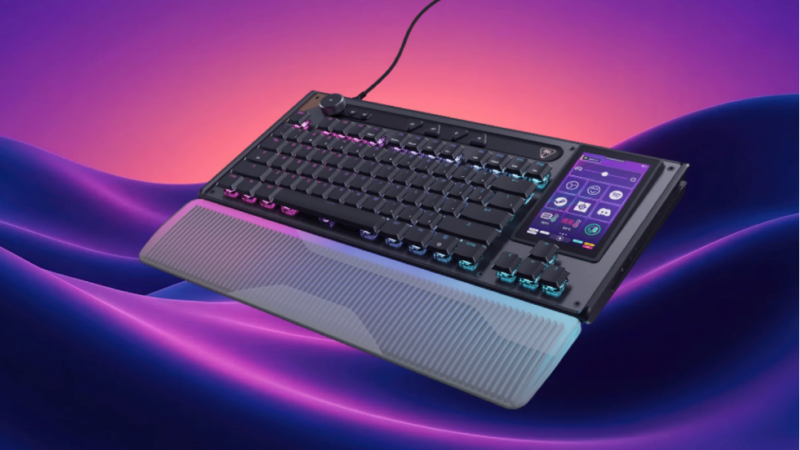
I’ve reviewed enough gaming keyboards at this point to know that reinventing one is easier said than done.
There are only so many ways to arrange the same collection of keys before improvements become anything more than incremental. Better switches, faster response times, nicer materials, brighter RGB, how well you like the sound of the clicks. Again, incremental.
For this reason alone, I find the Turtle Beach Command Series KB7 interesting in its attempt at genuinely trying something different.
At its core, the KB7 is an extremely premium tenkeyless gaming keyboard, pairing low-profile Hall Effect switches with adjustable actuation, Rapid Trigger, an 8,000Hz polling rate and the sort of build quality you’d expect from a keyboard sitting at the $350AUD price point. Turtle Beach also then stuck a 4.3-inch touchscreen on it.
Not content with that, the company has also released the KP7: a separate 28-key modular keypad that can attach to either side of the KB7 or operate completely independently.
On paper, it sounds like the sort of excessive PC peripheral I would usually struggle to justify. In practice, there are some genuinely clever ideas here. The problem is that the hardware currently feels several steps ahead of the software supporting it.
Design & Build
Before getting anywhere near the touchscreen, it’s worth pointing out that the KB7 is an excellent keyboard in its own right.
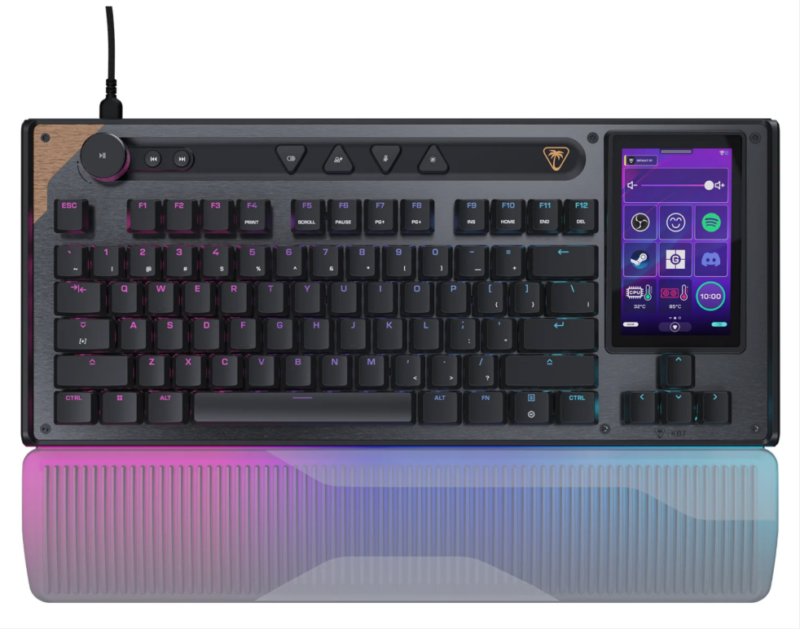
The low-profile design is sleek and surprisingly restrained, with an anodised aluminium top plate adding enough rigidity to make the whole thing feel suitably premium. The double-shot PBT keycaps feel excellent under the fingers, while the included detachable wrist rest continues the RGB lighting beyond the keyboard itself.
There’s enough weight here that the KB7 doesn’t move around during use, but it avoids becoming a brick, and it’s also surprisingly thin.
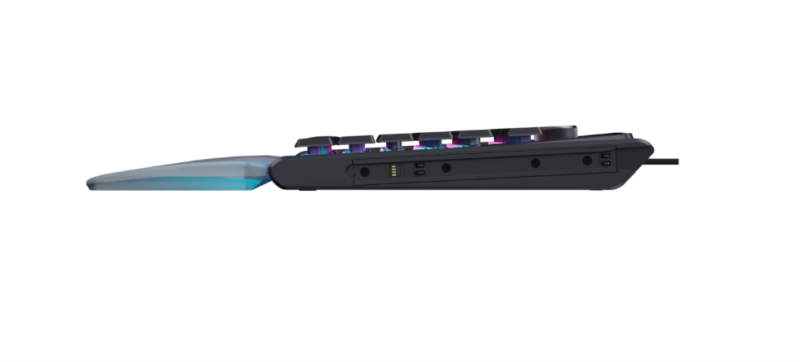
The chassis sits at just 29mm tall, and paired with the low-profile keys, it creates a comfortable typing position even before attaching the wrist rest.
Turtle Beach has also included an Action Bar across the top, combining dedicated media controls, a clickable volume dial and four programmable buttons. These are exactly the sort of physical controls I want on an expensive keyboard. They are immediately useful and accessible without having to remember some arcane combination of function keys.
Then your eyes inevitably drift towards the 4.3-inch screen. Turtle Beach calls it the Command Touch Display, and it replaces the navigation cluster you’d normally find on a tenkeyless keyboard. It’s bright, responsive and large enough that it feels more like a miniature control panel than a novelty LCD squeezed between some keys. The unusual positioning does mean this isn’t really a conventional TKL layout anymore, but that’s clearly the point. Running down either side of the keyboard are rails designed for Turtle Beach’s Command Series accessories. Currently, the most significant of these is the KP7.
Typing & Gaming
Thankfully, Turtle Beach hasn’t allowed the KB7’s party tricks to distract from the part that actually matters. It’s a really nice keyboard to use.
Underneath the PBT keycaps are Turtle Beach’s Titan low-profile Hall Effect switches. They’re linear magnetic switches with individually adjustable actuation between 0.1mm and 3.2mm, alongside Rapid Trigger and a rated lifespan of 100 million keystrokes. For anyone unfamiliar with Hall Effect keyboards, the important difference is that the keyboard can determine how far a key has physically travelled rather than simply registering a traditional fixed on/off actuation point. This ultimately gives you considerably more control over how each key behaves.
You can make WASD extraordinarily sensitive for gaming while leaving the rest of the keyboard requiring a deeper press, for example. For competitive players, those tiny differences can matter. For everybody else, it mostly means you can make the keyboard behave exactly how you want it to.
The KB7 also polls at 8,000Hz, with Turtle Beach quoting latency as low as 0.125ms. Whether most people could reliably distinguish that is another question entirely, but there’s certainly no shortage of performance available here.
The combination of the low-profile switches, sturdy chassis and PBT keycaps gives the KB7 a quick, smooth and satisfying typing experience. There’s none of the cheap hollowness that can undermine otherwise capable gaming keyboards, and the lower travel makes moving between keys feels particularly fast. That’s important because even if you ignored every other trick Turtle Beach has packed into it, the KB7 would still need to justify itself as a keyboard. Thankfully, it does.
The Command Touch Display
The touchscreen is simultaneously the most interesting part of the KB7 and the part that leaves me wanting considerably more. At 4.3 inches, it’s large enough to actually be useful. You can use it to switch profiles, monitor system information, control audio, trigger macros, launch applications and access integrations with software including OBS and Streamlabs. When everything is configured properly, it can feel genuinely futuristic.
Being able to reach down and change something directly from the keyboard rather than digging through another application or memorising another shortcut makes sense. The display is responsive enough that navigating it doesn’t feel like interacting with some cheap touchscreen bolted onto a keyboard as an afterthought. The problem is potential versus execution.
For something Turtle Beach calls the Command Touch Display, I want this screen to become the centre of my desktop workflow.
I want Spotify controls. Logic shortcuts. Application-specific controls. System monitoring. Lighting. Macros. Discord controls. OBS. Volume mixing. Custom pages that automatically change depending on what I’m doing.
Some of that is already possible. Some of it isn’t. And getting everything configured means spending time inside Turtle Beach’s Swarm II software, which remains the weakest part of the experience.
The KP7
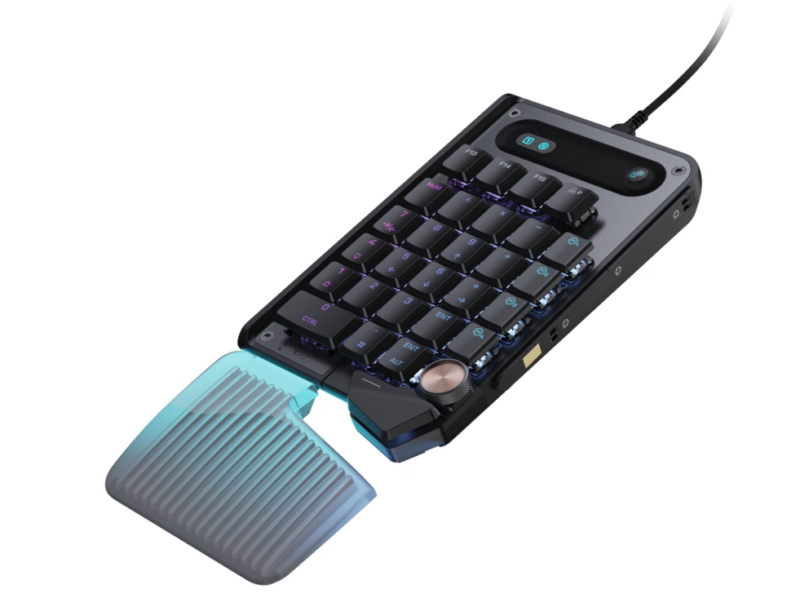
The KP7 is where Turtle Beach’s modular concept goes from interesting to genuinely unusual. It’s a 28-key Hall Effect keypad using essentially the same underlying technology as the KB7, including adjustable 0.1–3.2mm actuation, Rapid Trigger and 8,000Hz polling. There’s also a programmable scroll wheel, extendable thumb bar, detachable wrist rest and per-key RGB lighting.
You can slide it directly onto either side of the KB7, where it becomes part of one enormous keyboard setup. Or you can simply unplug it and put it somewhere else.
Use it conventionally, and the KP7 can restore the numpad deliberately omitted from the KB7’s TKL layout. Attach it to the left, and you’ve effectively created a dedicated bank of programmable gaming controls. Detach it entirely, and it becomes a standalone macro pad that can sit wherever makes the most sense on your desk.
For gaming, that means you can map the controls you actually need and keep your mouse hand completely unobstructed. For productivity, however, the possibilities become considerably more interesting. Editing shortcuts, application controls, macros and frequently used commands can all be moved onto a dedicated physical interface. For anyone working across video, audio, streaming or other shortcut-heavy applications, there’s potential for the KP7 to become something much more useful than a detachable numpad.
It’s an accessory that makes considerably more sense the more creatively you use it. There is, however, an obvious question. Do you actually need one?
The KB7 already isn’t cheap, and the KP7 is another premium peripheral on top of it. If all you’re doing is attaching it permanently to the right-hand side and using it as a numpad, you’ve essentially spent a considerable amount of money rebuilding the full-size keyboard Turtle Beach deliberately separated into two products. Use it as a genuinely programmable, movable extension of the KB7, however, and the argument becomes much stronger.
Verdict & Value
The Turtle Beach Command Series KB7 is one of the more interesting gaming keyboards I’ve used in some time. The Command Touch Display takes controls that would normally exist in software and puts them directly beneath your fingers. The modular rails allow the keyboard to physically change depending on what you’re doing. And the KP7 takes that concept further by giving you a bank of controls that can live on either side of the keyboard or somewhere else entirely.
Underneath all of that experimentation is also a genuinely excellent keyboard. The KB7 feels great to type on, performs exceptionally well while gaming and has the premium construction required to justify at least some of its substantial asking price. But the Command Series currently feels like an excellent first-generation product.
The hardware is ready, and the idea is there, but perhaps the software needs to catch up.
If Turtle Beach continues expanding what the touchscreen and modular ecosystem can actually do, the KB7 could become considerably more compelling over time. Right now, you’re paying a premium to get in early on that idea. The KP7 is harder to universally recommend because its value depends almost entirely on what you’re going to do with it. As a very expensive replacement numpad, it’s difficult to justify. As a programmable gaming, editing or productivity controller that happens to integrate perfectly with the KB7, it’s a much more interesting proposition.
But unlike plenty of gaming peripherals that throw features at a product simply to make the box more exciting, I actually want more.


FOUR STARS (OUT OF FIVE)
Highlights: Excellent low-profile typing experience; Highly customisable actuation and functionality; Innovative 4.3-inch touchscreen display; Versatile and modular KP7 keypad; Premium build quality and impressive gaming performance
Lowlights: Swarm II software remains frustrating and underdeveloped; Touchscreen functionality doesn’t yet realise its full potential; Premium pricing across both devices; KP7’s value depends heavily on how creatively you use it
Manufacturer: Turtle Beach
Price: KB7 – A$349.95; KP7 – A$154.00
Available: Now
Review based on units provided by Turtle Beach for review.
Featured header image provided by Turtle Beach.
