

The list of available routers seems to be growing daily, and there’s no doubt that most everyday users, or those in smaller homes or with entry-level internet speeds, don’t always need the most expensive options out there. That being said, there is a certain number of users who are on much faster speeds, or want to prioritise certain devices within their household.
And that’s where the TP-Link Archer GE550 BE9300 Tri-Band Wi-Fi 7 Gaming Router comes in. While that’s an absolute mouthful, it’s also a router that’s packed with plenty of customisable features, unique software and reliable performance.
It’s very much an option that I would recommend to a much smaller target audience, but it’s definitely a fantastic all-around option to cater for multiple users in any household, should the price tag suit.
Design
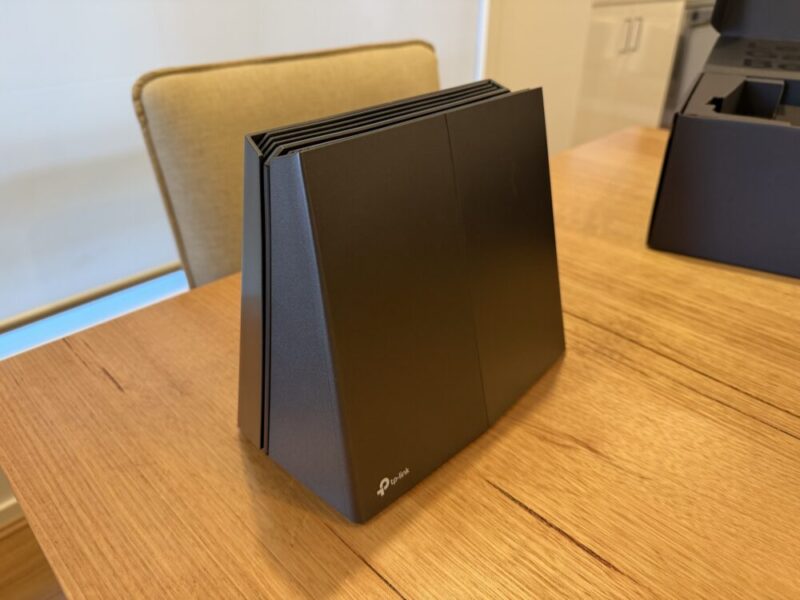
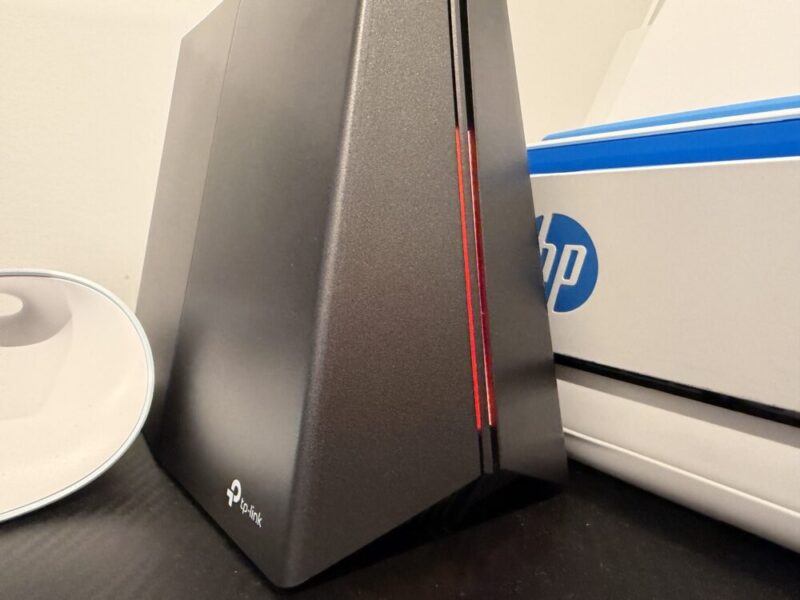
The design is probably going to land for gamers and completely miss the mark for others. TP-Link proudly describes the Archer GE550 with a “Game-Style Design”; I’m pretty sure that was just an excuse to make something that looks like a tall, slim pyramid, complete with customisable RGB lighting up front.
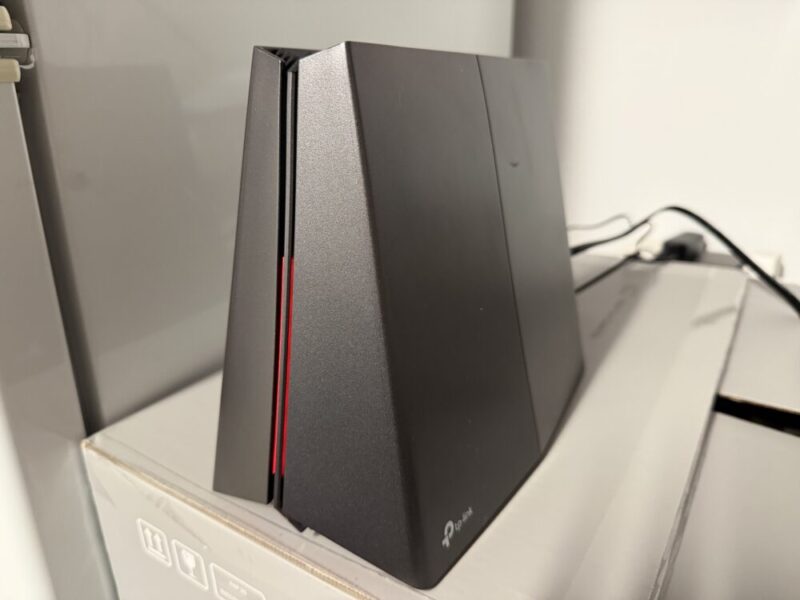
Most of the design choices beyond that feel incredibly clean and minimal, and also serve a particular function as well. For one, the lack of multiple flashing lights to indicate a type of connection or active LAN ports, while sometimes helpful, helps this feel really clean and sleek, while all ports and buttons are located around the back in one place.
I should also mention here that I’m a huge fan of taller routers as opposed to lower, flatter options, which take up more space in a particular area. The lack of any protruding antennas is also a huge plus.
Around the back, you’ll find your standard WAN port (labelled 5G Internet here), in addition to 1 x 5G LAN port and 3 x 2.5G LAN ports. There’s also a dedicated power button, an RGB light button to turn lights on and off, and a Wi-Fi/WPS button. It’s not much to write home about here from a design perspective, but it’s all clearly labelled and easy to locate.
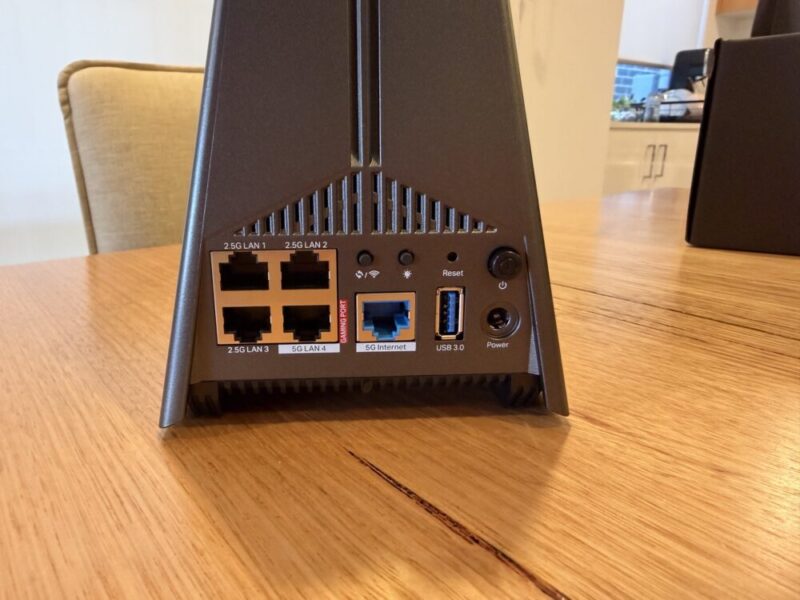
I would also like to take the time here to point out that the Archer GE550 has gone to certain lengths internally to set this apart from other routers, by including its upper and lower heat sinks closer to the bottom of the router. This, in tandem with additional space on the bottom of the stand, helps air flow better around the router, in through the top vents and down through the bottom. Even after a few days, it’s never gotten hotter than lukewarm.
The design of the Archer GE550 is really all about your perspective. I know for a fact that the majority of newer houses in Australia have their NBN boxes installed in the garage or somewhere out of sight in the home, so the unique design and RGB lighting might not even make a difference. It’s clear that the GE550 is meant to sit in line with a PC or gaming console in a more dedicated space, and for that reason, I’m a fan.
Perfromance
It might be a little easier to list the features on offer before we talk about the overall performance of the Archer GE550 router. You’re getting:
- Wi-Fi 7 support
- Tri-Band speeds with supported 6 GHz, 5 GHz and 2.4 GHz bands
- 1 x 5Gbps LAN port, 3 x 2.5 Gbps LAN ports
- Exclusive acceleration functions for games
- Dedicated Game Panel (via software)
- EasyMesh compatibility
While we will touch on this later, I would like to point out here that the setup was incredibly easy thanks to the TP-Link Tether app, which gets this running in around 5 minutes, assuming this is plugged in and ready.
Now, the Wi-Fi 7 support and tri-band speeds are nice, but for those unaware, let’s briefly unpack what they entail. Wi-Fi 7 is quickly becoming the new standard for Wi-Fi connectivity around the home, providing faster speeds of up to 46 Gbps, lower latency and better bandwidth for multiple users and devices throughout the home. It can also help provide a better range and is generally less affected by materials like walls, for better quality Wi-Fi when farther away.
Tri-Band speeds, including 6GHz, 5GHz and 2.4GHz bands, essentially dictate the quality of speeds you can attain throughout the home. While lower bands provide better range, higher bands provide much faster speeds. It’s always important to understand what band works best on each device, though. For example, an iPhone might only need to connect to a 2.4 GHz band for daily social media and streaming, while you might want to connect your PC or gaming console to that 5GHz or 6GHz band.
The Archer GE550 delivers 5764 Mbps on a 6 GHz band, 2882 Mbps on a 5 GHz band, and 574 Mbps on a 2.4 GHz band. By Australian standards, this is way faster than what most of us can get, or will even need for everyday use. I’m on the 1000 Mbps plan with Aussie Broadband, and while I can attain these speeds via LAN connection on the Archer GE550, we’re quite frankly, just not there yet.
Don’t get me wrong, performance here is incredible, and I even tried the Archer GE550 in 2 different locations to get the most out of testing. Firstly, I plugged this directly into my NBN box, which is pre-installed in my garage. My PC is about 10 metres away, my PS5 is around 15 metres away, and my Xbox Series X is almost 20 metres away, in the back room near my backyard. Even on my Series X, I was getting full bars and around 250 Mbps via Wi-Fi, which was honestly impressive. While this can change via software, we’ll leave that for later on in the review.
I also have 3 LAN ports installed throughout my home, which run back to my garage, and then into my router, to maximise speeds. There were really no issues to report here. Finally, I actually piggybacked this off my existing mesh system, using this as a second router, now placed in a more central location in the home, next to my PC. I then found that both my PS5 and Xbox Series X attained around the 400 Mbps mark, which is fantastic. While this second option is a little unique and redundant for most users, I will say that the Archer GE550 provides some solid Wi-Fi speeds and decent range throughout the home, making this an incredibly solid router on its own.
Now, keep in mind, I’m a gamer, and I include a gaming PC and multiple gaming consoles as examples, mainly because they utilise most of the bandwidth within my home. Also, keep in mind that I’m on one of the more premium internet plans available, which also helps give me those faster Wi-Fi speeds and bandwidth. But if you’re in the same boat as me, then this is an absolute win.
If that wasn’t enough, however, users can also take advantage of the EasyMesh compatibility, using multipole routers within this product range, to create their own mesh network.
But for A$599, this isn’t really a router that would suit most regular users, who don’t need higher speeds or even use devices with higher bandwidth needs and specs.
Software
You’re able to use the TP-Link web interface on PC, or via the TP-Link Tether mobile app, available on both iOS and Android. Either option is also a really great way to access the benefits and deeper features of the Archer GE550. Firstly, it’s incredibly well-presented and easy to navigate, and it’s made to feel much more like a traditional gaming app, with plenty of colours, graphics and menus. Once again, it’s kind of overbearing for an everyday user, but as a gamer, I love it.
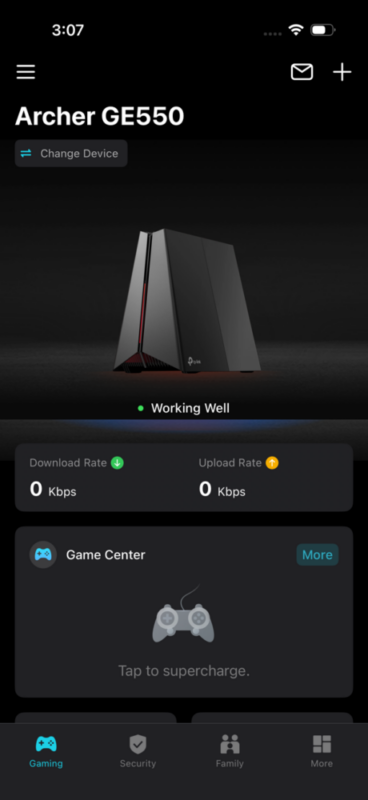
There’s defintely a few features I could pass on; the customisable RGB lighting section is one of them, but I found that if you’re looking to get the most out of certain consoles and devices, it’s well worth looking into. While I mentioned this was incredibly easy to set up, users can also assign a device password and even change the SSID name and network password at any point. Just don’t forget the new password.
The Game Centre is the main attraction here, and it can do a few things. For one, you can simply use the Game Boost feature to prioritise the total download and upload bandwidth of a particular device. While you will increase the overall performance of that device, please do keep in mind that this might affect the performance of other devices in the home when this particular device is in use.
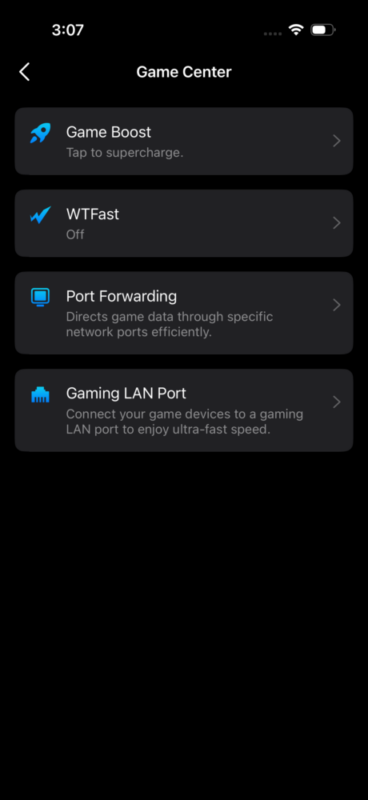
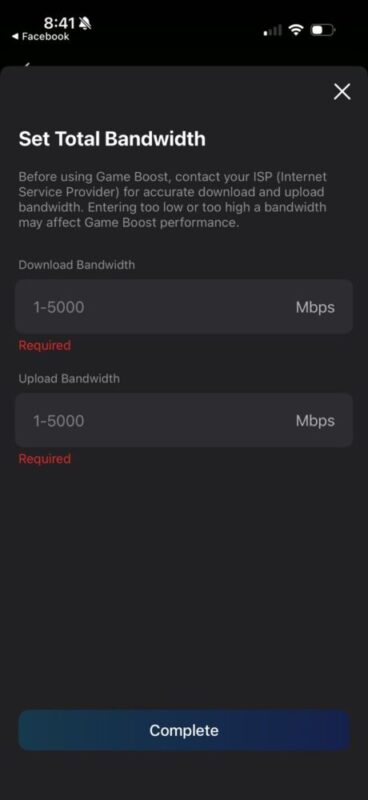
Users can also activate the WTFast feature, which essentially activates a third-party service that helps create a private network to bounce your traffic around various servers, therefore minimising lag and increasing responsiveness. I admittedly feel like this is a really tough metric to track, and while it’s a nice inclusion, I really do believe that higher download and upload speeds in conjunction with suitable bandwidth will always prevail. Given that the Archer GE550 can handle the latter option, I must recommend it.
Finally, users can also activate Port Forwarding, which directs game data through specific networks, and a Gaming LAN Port feature that prioritises the performance of one LAN port over another. If that wasn’t enough, you can also turn on a Traffic Usage feature to help track what devices are chewing through your bandwidth or certain bands.
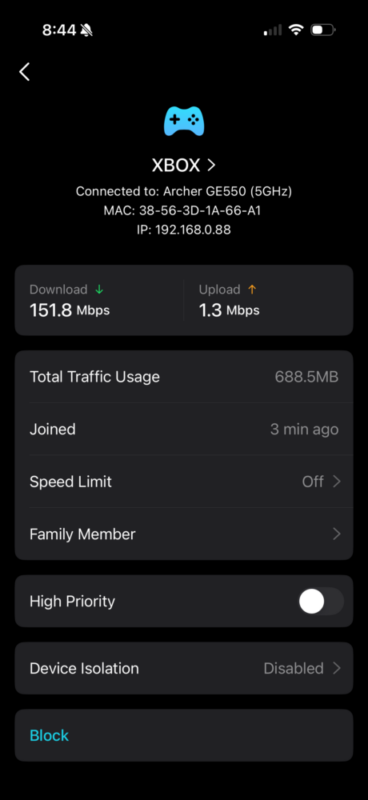
I must admit, these features will once again seem complex and somewhat unnecessary to the everyday user, but for those looking to get the most out of their setup and internet speeds, it’s a very welcome inclusion.
Verdict & Value
The TP-Link Archer GE550 BE9300 Tri-Band Wi-Fi 7 Gaming Router is a very premium option that caters to a very specific target audience.
But if you fit the bill, be it through preferred devices, faster internet speeds or specific bandwidth, then this is definitely for you. The Tether app certainly helps enhance the experience, but I found that the Wi-Fi 7 support, in conjunction with crazy speeds and even crazier LAN ports, makes this a dominant router for today, and a suitable option for years to come.


FOUR STARS (OUT OF FIVE)
Highlights: Provides a fantastic range and incredible speeds; Fantastic app that allows for plenty of customisable options; Plenty of high-speed LAN ports
Lowlights: RGB lighting seems redundant; Clearly aimed at a very specific target audience
Manufacturer: TP-Link
Price: A$599
Available: Now
Review based on unit supplied by TP-Link, and available at leading hardware retailers and online via Amazon.
