

There’s no shortage of controllers on the market these days, but for the most part, I find myself looking for another controller when I need something more. Sure, an extra controller is great for gaming with others, but the recent rise of pro-centric controllers has made not only competitive gaming but casual gaming more accessible to a wider audience.
Don’t like where the buttons are, or can’t change the controls from within the game? Well, why not have the controller do it for you?
We’ve had the pleasure of reviewing the GameSir X5s Wireless Mobile Game Controller recently, which heightened the quality of mobile gaming, and now we’re checking out the GameSir G7 Pro Wireless Controller for Xbox, PC and mobile.
Versatility aside, this new controller is packed with plenty of customisable options, extra buttons and a premium feel, making it a solid alternative and fantastic value if you’re looking to save a few bucks when compared to something like the Xbox Elite Wireless Controller Series 2.
Design
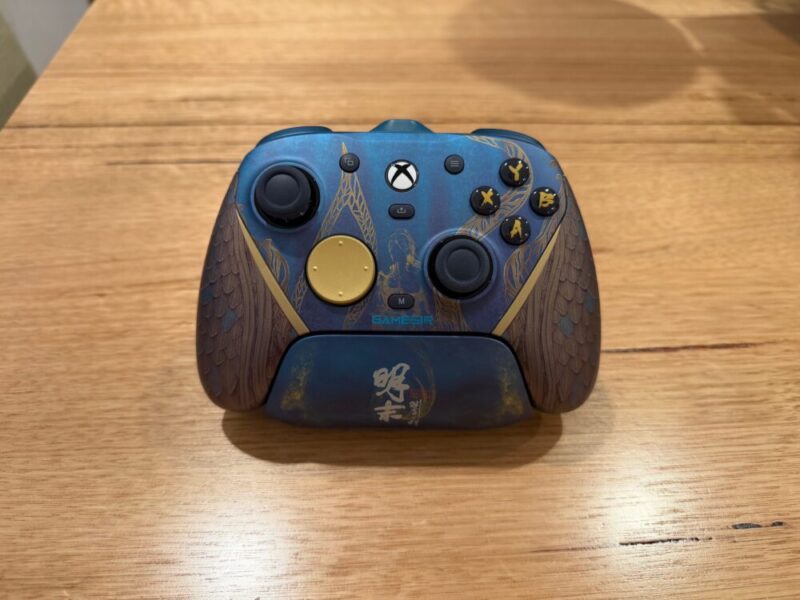
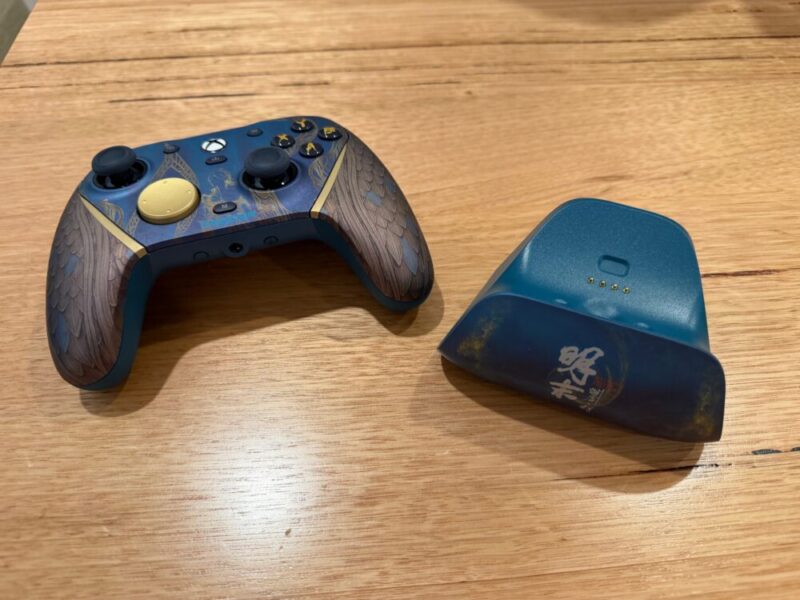
From a design perspective, the G7 Pro is a nice-looking controller. There are a few particular colourways available, but we had the pleasure of reviewing the Wuchang: Fallen Feathers Edition, based on the game of the same name.
I’m a fan of the blue and gold colour palette, along with the dragon scales that cascade down the left and right-hand sides, complete with a textured finish to match. The back isn’t as exciting, but we at least get a rubber grip around each side of the controller.
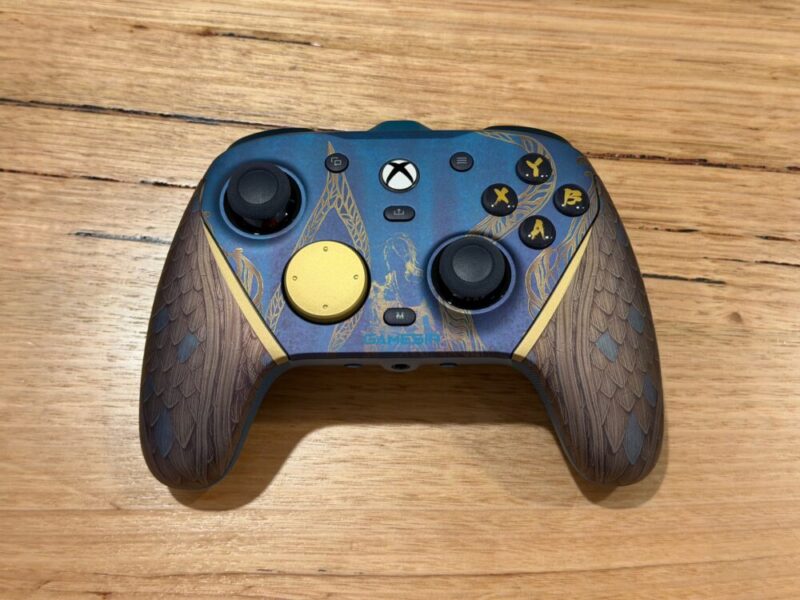
The four face buttons have also been given their own unique font, and the thumbsticks feature a very similar textured grip around the edges, akin to a standard Xbox controller. The standard circular directional pad is fine, but I’m a fan of the circular pad with raised directional edges, which also comes included.
The faceplate is also magnetic and comes in three specific parts, which can be swapped with other G7 series faceplates.
Around the back of the controller, you’ll find two extra back buttons for additional controls, along with four switches in each corner of the controller. The bottom left and right switches allow users to disable the functionality of these extra buttons so they’re not accidentally pressed during gameplay.
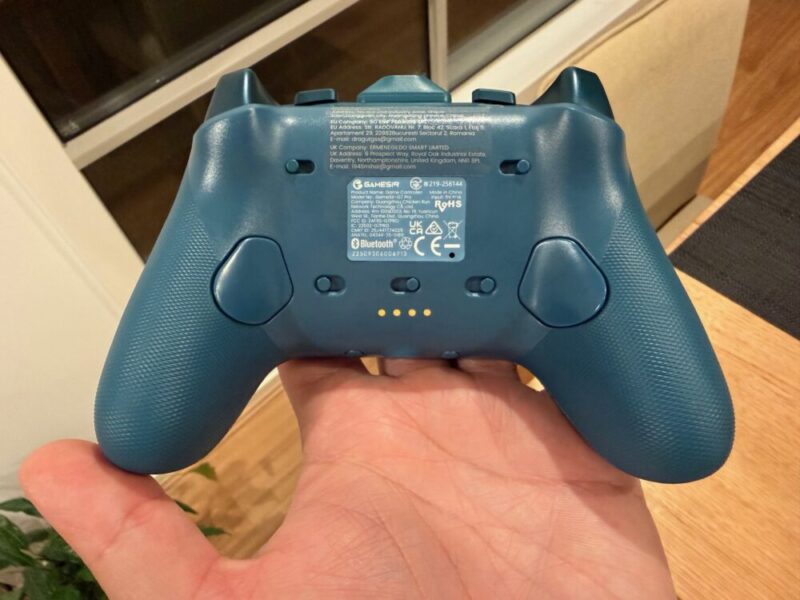
The top left and right switches allow users to lock the triggers so they feel like a very short mouse click instead of a traditional trigger. Finally, on the top of the controller, you’ll find two small buttons between the bumpers and triggers labelled L5 and R5, which account for additional customisable inputs.
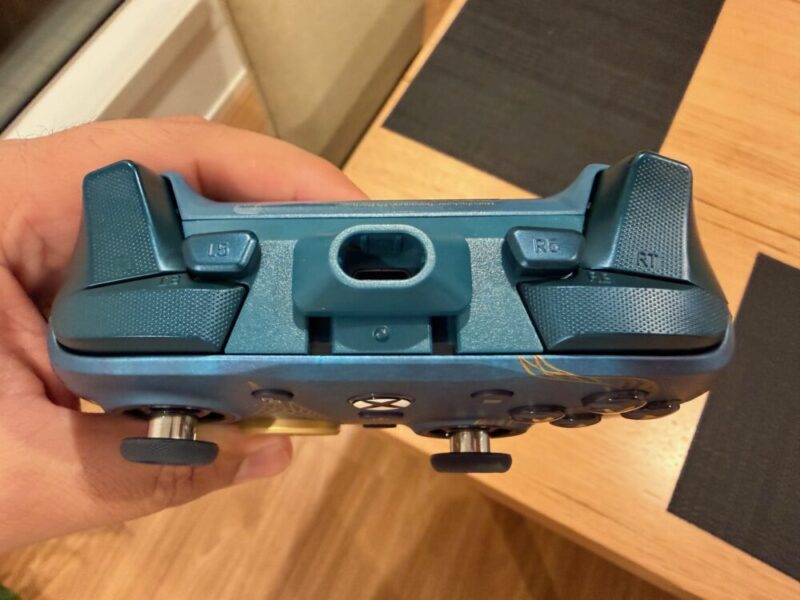
In the box, you’ll also get a matching charging stand on which the controller fits nicely, and glows blue at the bottom when the controller is charging. There’s even a premium braided 3-metre USB-C to USB-A cable, those two additional directional pads, a dedicated 2.4 GHz USB-A receiver, and a cool Wuchang: Fallen Feathers keyring, to celebrate the official collaboration.
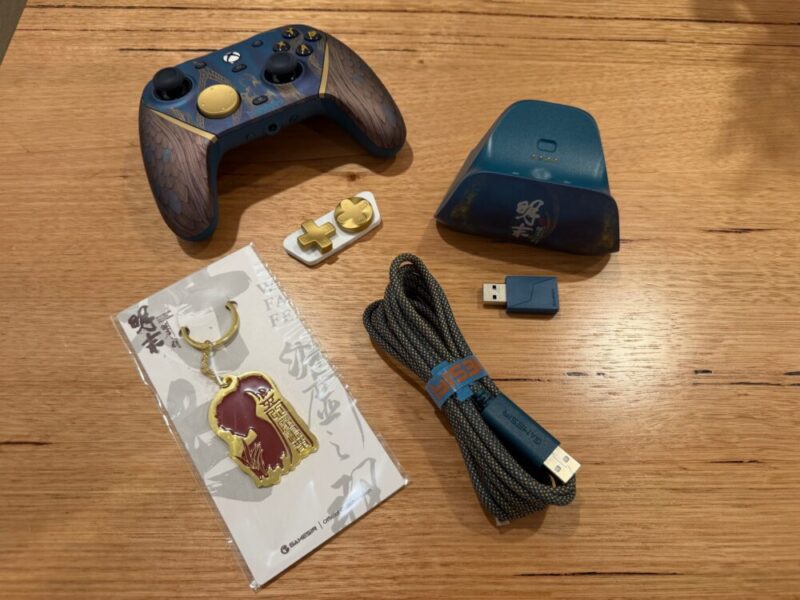
There’s no real setup required; simply plug the charging stand into your console or dedicated USB-A adapter, and for consoles, you’ll need to plug in that 2.4 GHz USB-A receiver and make sure the controller is on that matching 2.4 GHz mode via a central switch on the back. If you need to use a wired headset, there’s even a dedicated AUX port and microphone mute button below.
I’m a fan of the design and textured finsih which helps give the controller a premium look, but I would also like to take the time to mention the heft and weight of the controller, which also goes a long way in adding to the premium nature of such a controller. Too often do controllers feel like hollow pieces of plastic, and it can diminish the entire experience.
Performance
The G7 Pro controller feels great to use for any type of game. I’m not one to always customise my controls, but I find that when I stick to a game for a longer period of time, I find myself wanting to assign consistently used controls to these back buttons. But in saying that, I can’t get over how good every regular button on the controller actually feels.
For the longest time, I couldn’t figure it out, but the clicky nature of the face buttons feels more like a mouse click, as opposed to the softer press of a standard controller, and I love it.
The same applies to the Mag-Res TMR analogue sticks, which effectively utilise Hall Effect technology, making stick drift a thing of the past. I’m not surprised it’s featured in a controller at this price point, and I can only hope it becomes a more consistent feature in the future. The triggers can also be used in two distinct modes, thanks to the handy switches around the back on each side.
By default, the G7 Pro utilises the Hall Effect triggers, which can be customised to input commands at certain points, but they can also be locked to simulate a small click, once again akin to a mouse click. I found it quite handy on first-person shooters to lock the right trigger to a click for faster reaction times, while leaving the left trigger as normal for aiming.
There’s even a dedicated Hair Trigger Mode, which can be activated at any time by holding the M button on the face of the controller while holding either of the triggers for two seconds, which can toggle it on or off. Here, you’ll get an instant reaction, no matter the trigger setting.
The two smaller buttons on the top of the controller might seem small, but they are incredibly easy to find thanks to their raised positioning between the bumpers and triggers. I must admit, I wasn’t relying on these as much as the back buttons, but I can commend their inclusion, as opposed to additional back paddles, which can feel a little convoluted at times.
Beyond the additional controls, the G7 Pro gains points for its versatility across Xbox, PC and mobile platforms. There are even multiple ways to connect for the sake of convenience. On Xbox, you can simply use it wired, but you’ll need to utilise the included 2.4 GHz adapter for wireless use. That can be a little annoying as it now takes up two USB ports on the console, with one for the dock and one for the controller. You’ll be able to use this on PC, wired or wireless via Bluetooth and the 2.4 GHz adapter.
On mobile, it’s only Bluetooth, but it’s thankfully incredibly easy to switch between these modes via a dedicated switch on the back of the controller. That being said, there are reasons to use that adapter on PC as well, as it’s required in order to customise the controller via the GameSir Nexus app.
Software
The GameSir Nexus app is accessible only on PC at the moment, as the mobile app doesn’t feature the G7 Pro on its compatible device list. Once connected via USB-C to USB-A cable or via the 2.4 GHz dongle, the controller is detected right away, and you can customise controls as you like on the main home screen.
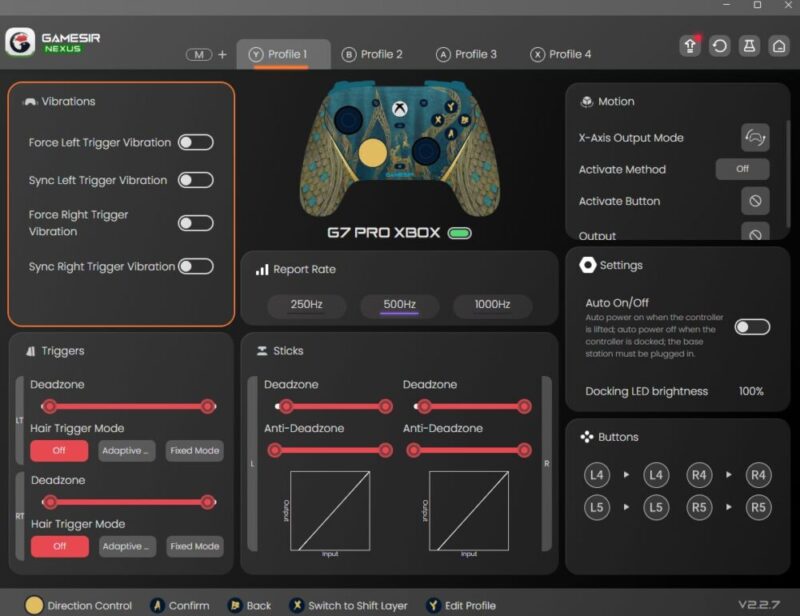
Here, you can also get into the finer details of controller customisation, including analogue stick deadzones, polling rates (only on PC) for lower input lag, vibration sensitivity and active locations for the four rumble motors, and gyroscopic controls, the latter of which is only available on PC.
I found here that even the LED light for the dock can be adjusted or turned off entirely, as the light will continuously flash as the controller is charging. If you’re keeping this on a TV unit, as I am, it can get a little annoying when you’re trying to watch TV. You can also switch the Hair Trigger Mode, you can also switch between an Adaptive Mode, which turns on when it detects you’re using the triggers more often and a Fixed Mode, which always keeps the setting on.
Finally, you’ll also be able to save these changes to one of four specific user profiles. It’s a fine piece of software that’s basic enough to access and use, but wish there was a way to access this via Bluetooth on the GameSir mobile app for the sake of convenience.
Verdict & Value
Overall, the GameSir G7 Pro Wireless Controller is a solid premium alternative that justifies its price tag with numerous customisable options and additional buttons.
I’m a fan of the Wuchang: Fallen Feathers Edition, complete with its matching charging dock, directional pads and cables, but the controller itself remains a versatile option for multiple platforms.


FOUR STARS (OUT OF FIVE)
Highlights: Premium look and feel; Additional back and top buttons; Face buttons and triggers feel great
Lowlights: Software isn’t accessible on mobile
Manufacturer: GameSir
Price: A$199.95
Available: Now available at JB Hi-Fi and The Gamesmen.
Review based on unit provided by GameSir.
