

I’m at a point in my life where most people around me, including myself, are trying to find ways to switch off from the loud, incessant need to be on our phones. The other day, my best friend genuinely told me that she was looking into alternatives to being on her phone less and told me that the BOOX Palma 2 would be the perfect alternative to only paying attention to the necessary things in life.
But as someone who has a million and one things on her to-do list, and a phone that is full of note app reminders, it’s hard not to be on my phone. So when I was allowed to trial the BOOX Note Max, I was keen to see if it would make a difference to my day-to-day.
Design
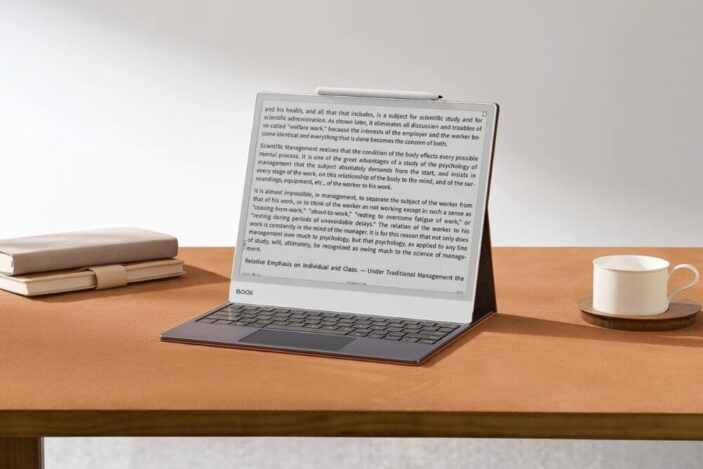
The BOOX Note Max comes with the tablet, BOOX Pen, USB-C to USB-A charging cable, and the manual. The simple and clean design of the BOOX Note Max works incredibly well with the aesthetic and ethos of the product, creating a design that allows for simplicity and the ability to enhance the workspace with ease.
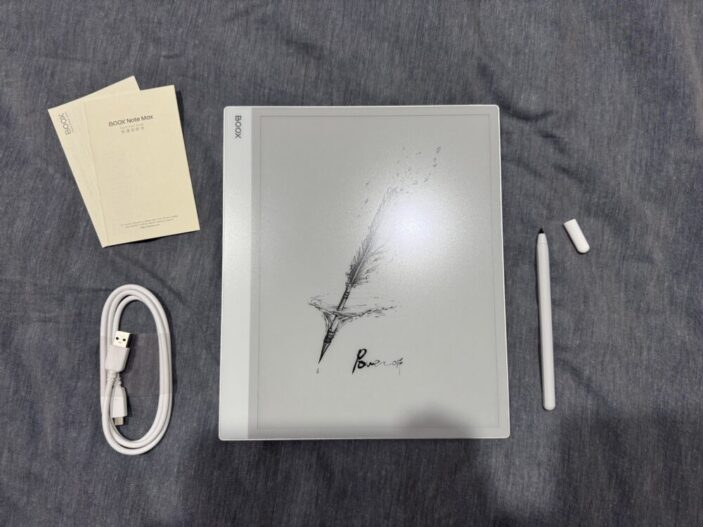
With a 4.6mm thickness and a 13.3-inch Monochrome ePaper display, the tablet is around the size of a standard laptop, which makes it compact and light enough (615 grams) to travel with.
Users are also able to include add-ons like a detachable keyboard and protective case to help organise workflows even more.
Performance
The BOOX Note Max includes a Carta 1300 screen (which just means that the contrast is new and improved with a quicker refresh rate, and more responsive to what the real reading and writing experience is like), the ability to function on Android 13, and a 2.8GHz Octa-Core CPU with 6GB RAM. All in all, it should be able to allow for multitasking at a higher and more efficient rate, which is what I intended to do.
I mainly used the BOOX Note Max to write down notes and ideas, write to-do lists and reminders in the built-in calendar, annotate books, and read on my commute to work. In an effort to be on my phone less, this has forced me (in the best way) to work my brain in the morning and be productive. I’d be able to sit and read, or if I had some sort of creative thought pop up, I would just switch to the notes app and jot down quickly what I was thinking, and go straight back into reading.
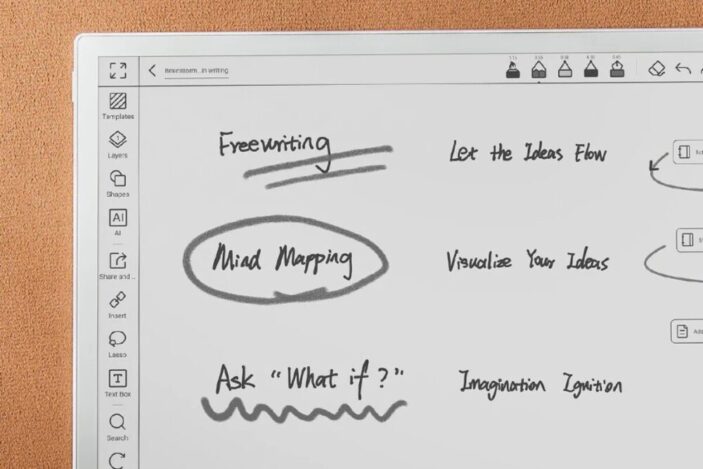
I was also surprised at how much the Notes app could do. You could use different types of pen styles, create text boxes, add shapes, layers, and even outlines to organise your notes. The pen was also really smooth on the tablet and almost felt like writing on paper. But I found that the pages and other applications used previously would bleed onto the screen, burning the last image into the newest one, which could be a bit distracting, but not too big an issue.
The BOOX Pen is also magnetic and sticks to the side of the tablet, but I also found that the magnet wasn’t that strong and would fall to the bottom of my bag every single time. So maybe a more secure way to store the pen could make it even better.
During the times I wasn’t using the BOOX Note Max for reading or note-taking, I was able to use it as a clock or an alarm by changing the default screensaver, but found that the time was permanently set to the time I locked the tablet and wouldn’t change.
The interface was also a little confusing, with some of the icons not being completely clear as to what their function was, and I had to Google a few things to understand how to use the BOOX Note Max at its highest potential. Even then, I was left feeling a little confused about some functions that weren’t just related to reading, note-taking, and annotating. So the UI wasn’t the most friendly or easy to use, despite running on any Android 13 System.
And unfortunately, the battery life didn’t last very long, having to charge it fully once or twice a week, depending on how much I used it.
Verdict & Value
Other than minor issues with the interface and other Android features, the BOOX Note Max does exactly what it’s intended to do: create a space where you can take notes, annotate, and read to improve your workflow.
Even with the built-in capacities of an Android 13 System, if you wanted to do more than the intended purposes of the BOOX Note Max, you may have to opt for something a little bit more powerful.


THREE STARS (OUT OF FIVE)
Highlights: Works really well as an e-reader and a note taker.
Lowlights: Some issues with the interface, including burnt-in images and ease of use in terms of apps and meanings of functionality, and a weak battery life.
Manufacturer: BOOX
Price: A$1099
Available: Now via the BOOX website.
Review conducted with a unit supplied by BOOX.
Featured header image provided by BOOX.
