

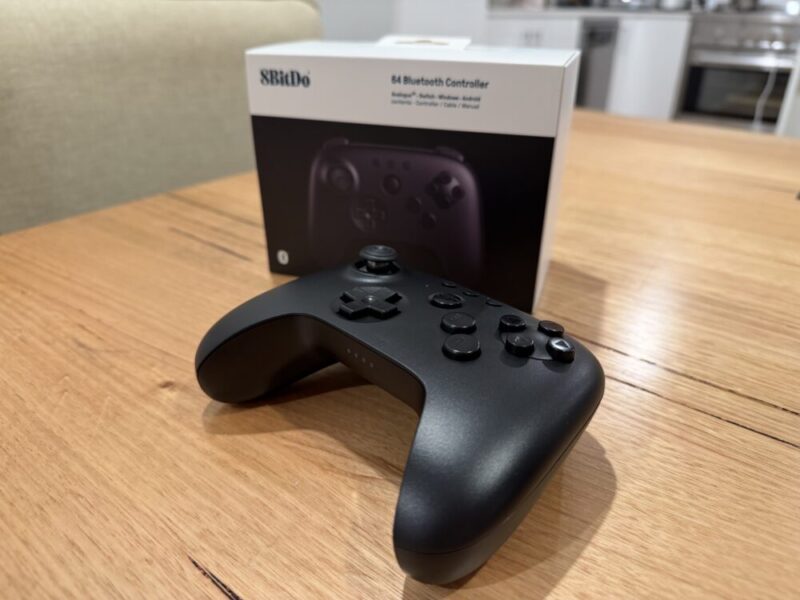
If you have memories of gaming on the original Nintendo 64 like me, then you might feel a certain way about that controller. And I must be honest; while there’s no denying its unique design, I never really fell in love with that original controller. Sure, there were aspects that I liked, including that sweet central analogue stick, but for the most part, I never really knew how to hold it, and it seemed as though every game wanted me to hold it in a different way.
While I love my modern controllers, including the DualSense, the Xbox Series X controller and even the Nintendo Switch 2 Pro Controller, I find myself in a litle it of a conundrum. In playing older games, especially those older Nintendo 64 games via the Nintendo Switch Online service, there’s a missing nostalgic kick.
To be fair, Nintendo did go ahead and make a wireless Nintendo 64 controller for its library of N64 titles, but I feel as though the 8BitDo 64 Bluetooth Controller blends that line between nostalgic feel and modern design rather flawlessly, making retro gaming that much more satisfying across multiple platforms, including the newer Analogue 3D.
Design
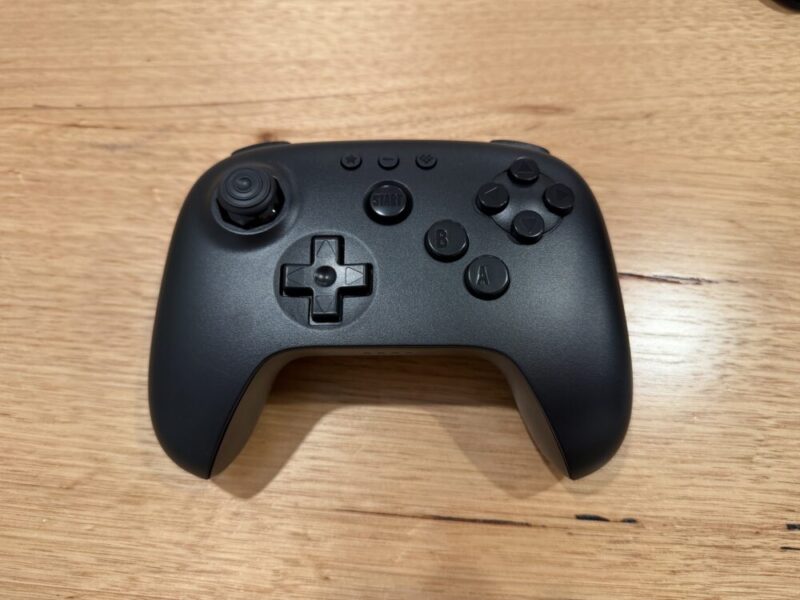
From a design perspective, the 8BitDo 64 Bluetooth Controller looks incredible, although it’s worth noting that this is essentially made only for Nintendo 64 games. It’s available in Black, White, or the iconic Grey, complete with the same coloured buttons as the original controller.
Designed much like a modern controller, it fits the hands wonderfully and feels incredibly sturdy. The central analogue stick of the original controller is now located on the left thumb, with the traditional D-Pad slightly below.
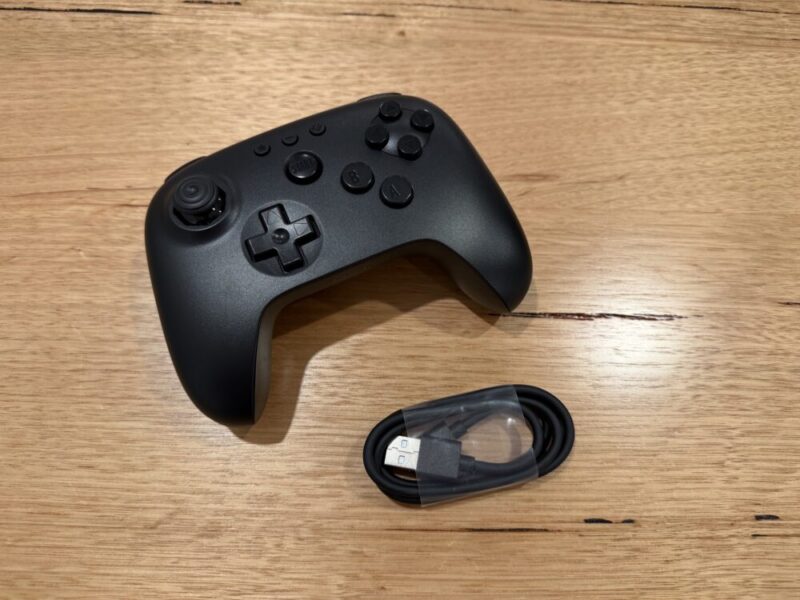
I can understand how this mimics the asymmetrical design of a Switch Pro Controller or Xbox controller, for example, but I feel as though it would have made a little more sense to have the D-Pad higher to the left, and the stick toward the bottom, which would feel much closer to an original Nintendo 64 controller.
Beyond that, the right side of the controller is essentially as you remember, with the A and B buttons lower down, across from the D-Pad, and the C-Buttons on top. In line with modern controllers, however, the Z button has been divided into two separate triggers, which sit behind the L and R bumpers. It’s a little strange at first, but given you can customise these commands to your liking, and use your preferred finger for the actual command, I’m willing to give it a pass.
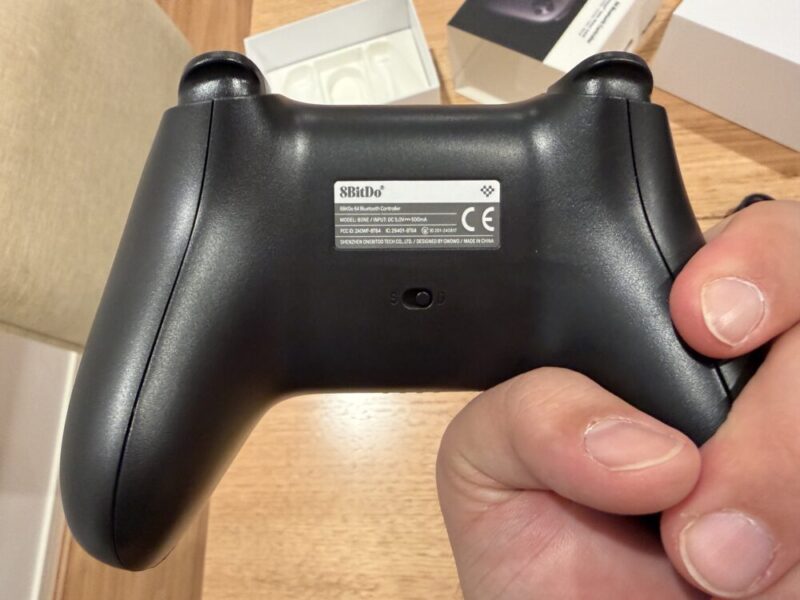
On top of the controller, you’ll also find a USB-C port for wired use and charging, along with a small button for Bluetooth connectivity. Around the back of the controller, you’ll find a switch that toggles between certain platforms. The S seems to be specifically for the Switch, while the D seems to be for everything else, as far as the included manual explains things.
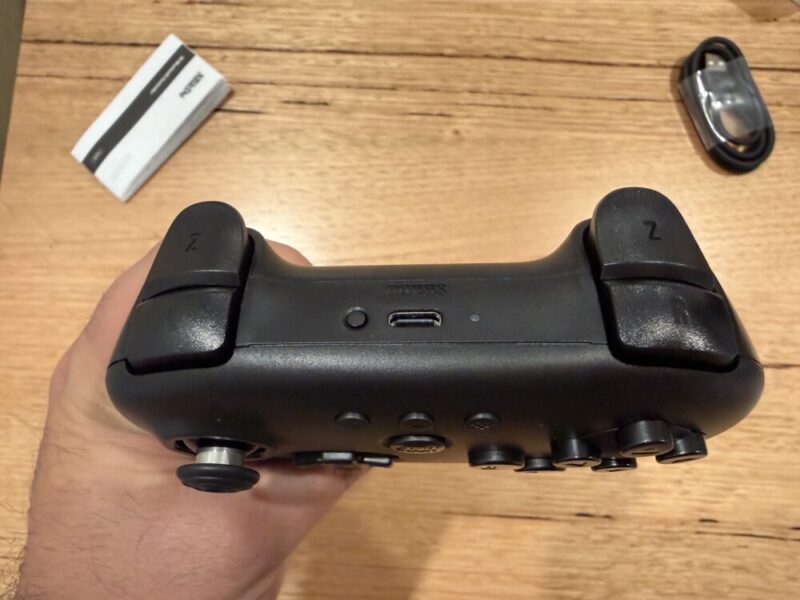
Finally, above the central start button on the face of the controller, you’ll find three distinct buttons, being the Star button, Select button and Home button, each of which can be used for various functions, which we’ll explain later in this review. In the box, you’ll also find a 1-metre USB-A to USB-C cable, which can be used for both wired connections and general charging.
Performance
The 8BitDo 64 Bluetooth Controller simply feels great in the hands. The buttons generally feel a little flatter than those on the original controller, but I personally feel that it makes them a little snappier and more responsive. The D-Pad has also been replicated to perfection, although it does feel twitchy, especially when you’re using it to navigate menus, for example.
The thumbstick feels absolutely incredible, something that’s taken all the best design elements like the textured grip, while lowering the overall profile to help it feel a little more accurate. The fact that it’s now utilising a Hall effect sensor in the stick, combined with that traditional 8-way pattern to help the stick fall into a particular position, feels like a match made in heaven. For some reason, though, it can feel a little sensitive when you use it to aim, particularly in games like GoldenEye 007.
I spent most of my time using this on the Nintendo Switch 2, and there are a few things to mention here, which may influence your decision. While the 8BitDo 64 Bluetooth Controller works on the original Nintendo Switch, it has been noted that not all games work as expected on the Switch 2. That being said, I’m yet to come across any games that have been negatively impacted by this, and have tried games like GoldenEye 007, Mario Kart 64 and The Legend of Zelda: Ocarina of Time and Majora’s Mask, all via the Nintendo Switch Online library. The only thing I’ve noticed is that the right Z button does seem to be the ZR button by default on both the Switch and Switch 2.
You’ll also be able to hit the Select button towards the top of the controller to activate a Turbo function, and you can even assign certain commands and buttons to that Turbo function alone. Simply hold the button you wish to activate, hit the Select button twice, and it’s on. You only need to repeat the process with that same button to turn the function off.
You can even use the same Select button to hotswap buttons. Simply hold both buttons, press the select button to swap them, and you’re done. If that wasn’t enough, however, you can even use the Switch or Switch 2 to change commands directly from the console’s controller settings. On the Nintendo Switch 2, the remaining commands are quite basic. The Star button replaces the Screenshot button, and the 8BitDo logo button acts as the Home button.
The only major gripe I have with the 8BitDo 64 Bluetooth Controller on the Switch 2 is the inability to wake the Switch 2 wirelessly from Sleep Mode. I’ve tried everything, including installing the newest firmware update from February this year via the 8BitDo Ultimate Software V2 on my PC (which we’ll touch on soon), but I cannot get this thing to work.
Instead, you’ll have to wake the Switch 2 up with another controller, or by pressing the power button on the console itself, before then holding the Start button for this to pair once again. It’s really annoying if you have to do this every time, and I hope it’s something they fix, considering it’s not an issue on the original Nintendo Switch. It is nice that the Switch and Switch 2 recognise this immediately as a Nintendo 64 controller, though.
Off the recommended 4 hours of charging time, the 8BitDo 64 Bluetooth Controller will put out up to 36 hours of playtime, which is incredibly impressive. I’ve been using this controller almost every night for the better part of 2 weeks, and I’m yet to recharge it.
Finally, it’s worth noting that you’ll also be able to flick the 8BitDo 64 Bluetooth Controller to its D mode, located on the back of the controller, to connect to other devices like a Windows PC or even the Analogue 3D, a newer console that essentially emulates your Nintendo 64 games locally, with updated resolutions via HDMI. It looks incredible, and this is basically the recommended controller for it. Should you rely on emulation via Android or Windows devices, this is incredibly easy to connect and use via Bluetooth or with the included USB-A to USB-C cable.
There’s plenty to love about the 8BitDo 64 Bluetooth Controller, but I feel as though it’s doing enough to replicate the original Nintendo 64 controller where it counts.
Software
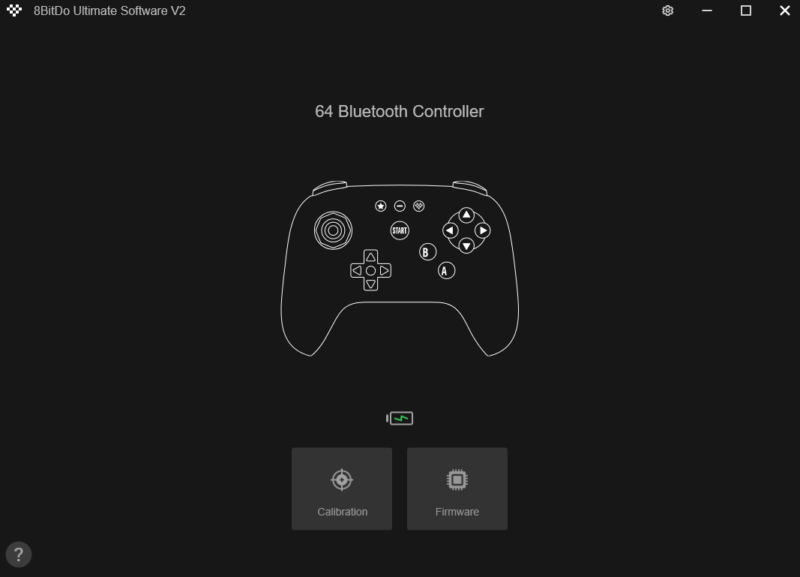
I have installed the 8BitDo Ultimate Software V2 previously on my PC for other 8BitDo products, and I hate to say, it’s no real walk in the park. The manual barely mentions its software, and actually downloading the software comes in the form of a zip folder, meaning you have to unzip it and access it again. That might sound straightforward, but to those unititaied, it can seem rather daunting and confusing, as this won’t initially open automatically.
Once you’re in, it’s disappointingly basic. All you can really do is update the firmware and calibrate the analogue stick, should something feel off. There’s no ability to swap and assign commands, which feels like a missed opportunity.
Verdict & Value
Overall, the 8BitDo 64 Bluetooth Controller feels incredible in the hands, and makes retro gaming via the Nintendo Switch Online library or emulation across multiple platforms feel like a breeze.
Minimal software and Nintendo Switch 2 connection issues aside, I feel like this is one of the best marriages between a classic feel and modern design that you’ll find in a controller. Long live the Nintendo 64.


FOUR STARS (OUT OF FIVE)
Highlights: Incredible design and build quality; Easy to tweak and adjust; Fantastic battery life
Lowlights: Switch 2 connectivity issues; Disappointing software
Manufacturer: 8BitDo
Price: A$69
Available: Now
Review based on unit supplied by 8BitDo and available via the official 8BitDo website.
