

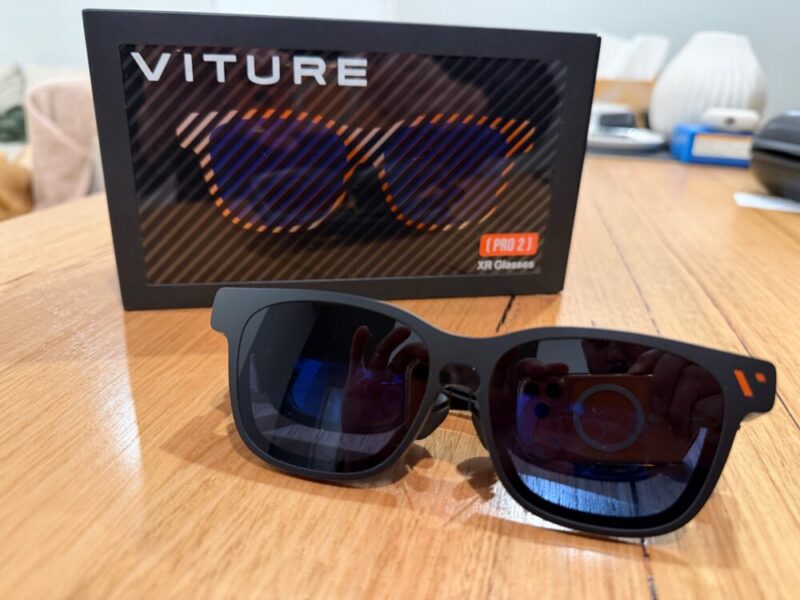
There might be a few options out there, but I admittedly have next to no experience with AR/XR glasses before trying out the Viture Pro 2 XR Glasses. But upon doing a little more research, why wouldn’t I want to try something like this? You mean I can have a massive screen on my face without the need for a dedicated setup, both anywhere and everywhere? Sign me up.
For the most part, Viture’s latest Pro 2 XR Glasses do a great job of providing something that not only feels luxurious and premium, but also convenient and easy to use, further justifying its price tag. There are obviously various cases where such a device would come in handy, but I would argue these even hold up on the comfort of your own couch at home.
We also got the chance to try the Viture Pro Mobile Dock, a separate device which allows users to get a little more out of gaming consoles along with dedicated USB-C and HDMI devices.
Design
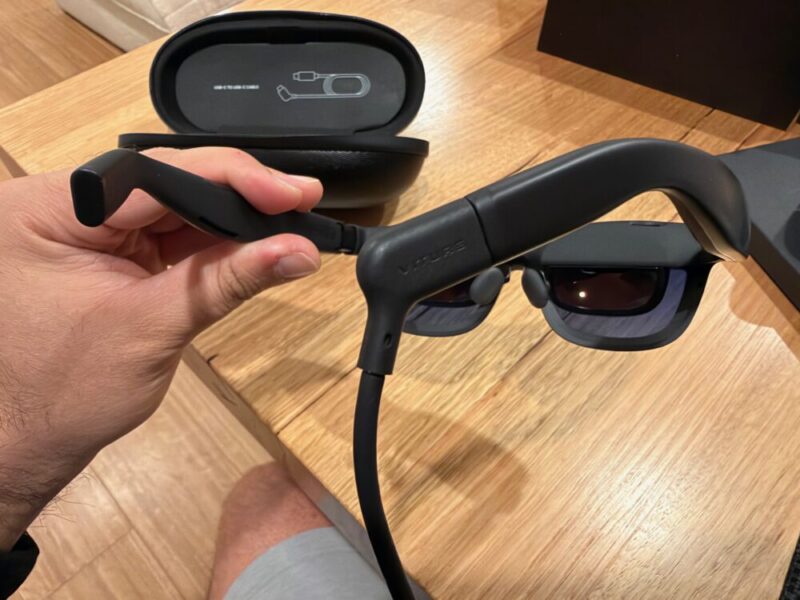
The wayfarer design of the Pro 2 is sleek and minimal, and you’ll barely feel the weight on your ears and nose, even after a few hours. The matte black finish is also really nice, and while you can’t actually wear them as everyday glasses, they are much lighter and thinner than their predecessor as well.
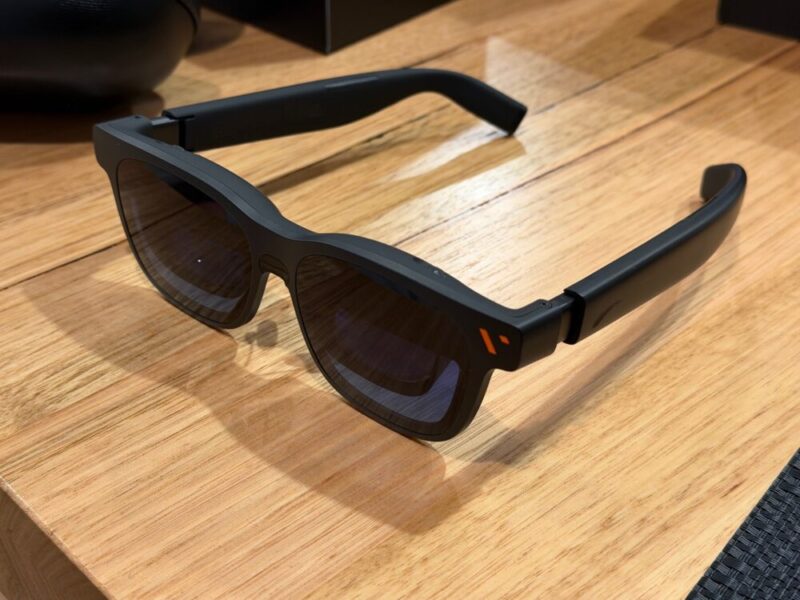
The glasses are relatively straightforward to use, given they require a connected device in order to function. On the left arm, you’ll find a dedicated button to control brightness and volume, in addition to a slider to adjust those relevant settings.
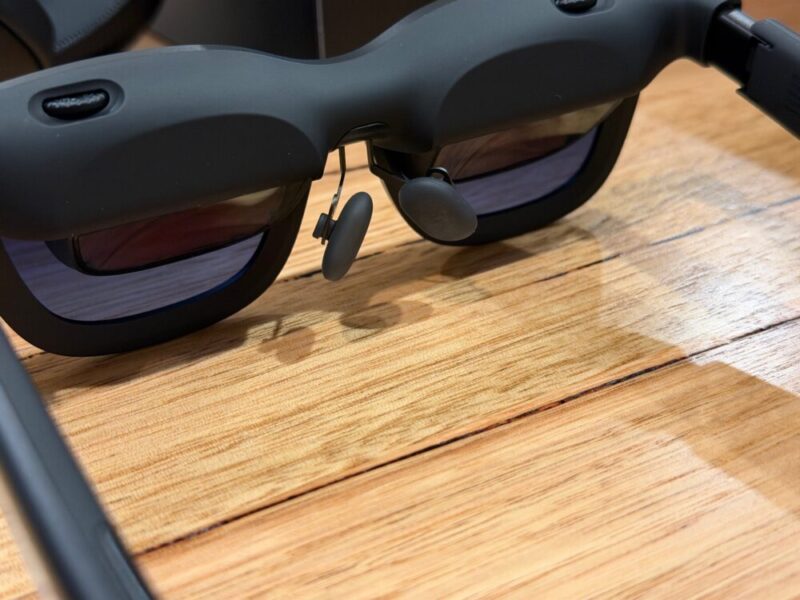
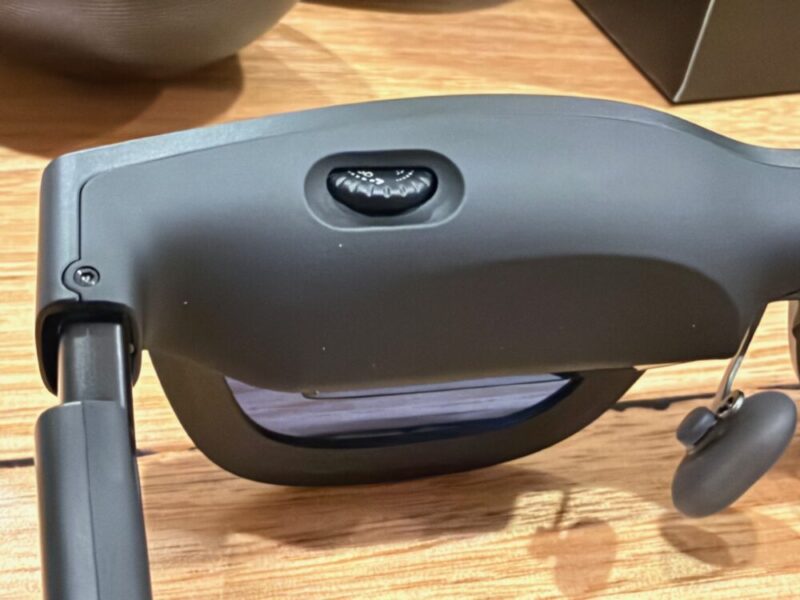
Along the top rim of the glasses above each eye, you’ll find diopter adjustments, or small wheels to help you adjust the focus for each eye. The arms also snap into one of three angles to help you find the best fit, which is incredibly easy. In the box, you’ll also find a couple of different sizes for the nose pad arms, along with a couple of interchangeable pads, which can also be placed in one of three locations within each of the nose pad arms. But I must say, some setup is required.
Everyone’s nose and head will be different, and you will have to pop a couple of these on and off to find the right angle. It’s easy enough to do, as the nose pad arms pop out simply by pinching them and pulling them away from the centre of the glasses. But given the screen is supposed to sit at the centre of your field of view, it’s all in service of a much more comfortable experience. My slightly bigger nose did not agree with the default option, and I had to move those pads slightly downwards for a broader fit, to help them sit a little nicer.
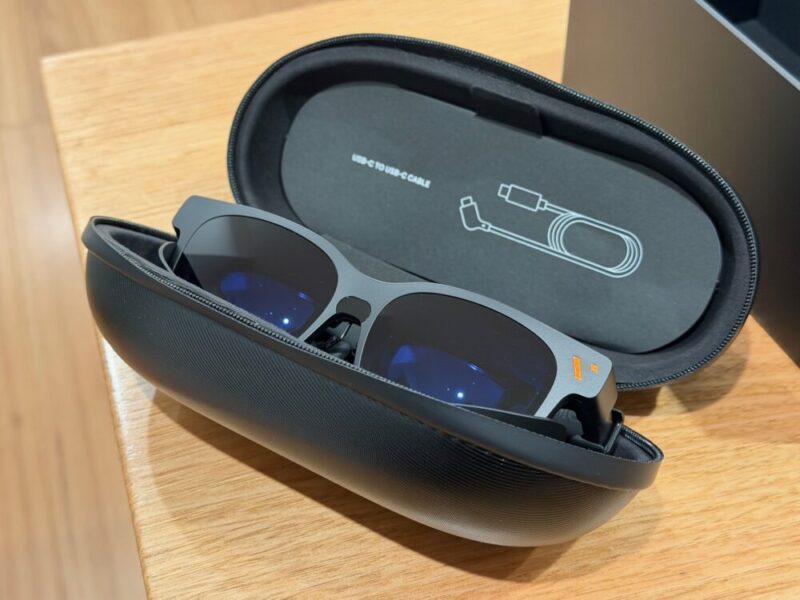
Finally, the glasses come with a really nice hard carry case and a USB-C to USB-C cable, which can also be stored within the upper section of said case.
Performance
The idea of getting your own private screen wherever you go is nice, but what would that be worth if it was terrible to look at? Thankfully, I’m not quite sure, as the Pro 2 absolutely delivers. You’re essentially getting a 1080p resolution display, with refresh rates of up to 120Hz, all of which can be viewed at up to 146 inches when up to 4 metres away. Thanks to Sony’s Micro-OLED technology, you’re also getting some incredible clarity and contrast, while the UltraClarity 3.0 support ensures that the screen is clear from edge to edge.
It really is hard to complain about the results. The 1,600-nit peak brightness display is suitable for any setting, and at times, I felt it might have been a little too bright. Given the actual display sits quite close to your eyes within the glasses themselves, the 1080p resolution is totally fine. There’s also a 50-degree field of view, which helps the screen feel massive in most living room-sized settings, without ever feeling overbearing.
I haven’t tried any AR/XR glasses before the Pro 2, but I found that these cover 108% of sRGB, which is surprising, given that’s also what the higher-end Viture Luma Ultra glasses cover. That being said, there’s no HDR/HDR10 support here. While that might disappoint some, I will go so far as to say that things never felt dull or bland, and I tried this across several devices, including my iPhone 17 Pro, PS5, Nintendo Switch 2 and Xbox Series X.
Another huge feature which should not go unnoticed is the inclusion of diopter adjustments. Those two small wheels above each eye aren’t just for general focus; they let you adjust each lens to your eyes. This helps with nearsightedness, and the -5.0D lenses are a real game changer if you were dreading wearing your own glasses through these as well.
The only real gripe or downside to the entire experience is the sound. The speakers on each arm aren’t terrible, but they’re definitely closer to average. It’s loud enough, but it can sound a little tinny at times, and sound leakage is definitely an issue. That obviously won’t apply everywhere, but if you’re sitting next to someone on a plane, for example, they will hear you blasting these at full volume.
As far as all these features and specs are concerned, I’m actually quite surprised at what you’re getting for the price. At A$629, these serve as the newest entry-level glasses in the range, which is admittedly confusing, as the original Pro XR Glasses were considered a premium-tier model within that respective range. That being said, I feel as though this will suit several casual and hardcore users alike, thanks to its easy setup and nifty features like its incredible brightness, Micro-OLED contrast and even a smoother 102Hz refresh rate.
Software
Users can also download the SpaceWalker app on iOS or Android, the Immersive 3D app on macOS or Windows, or even the GamePal app on Android for additional support, although that last option is specifically for use with 8BitDo game controllers. For the purposes of this review, I’ll be referring primarily to the SpaceWalker app on iOS, as I found it to be the most convenient option.
While completely optional, this app does a few cool things. Firstly, it enables you to watch content in 3D, and with varying levels of intensity, it’s not bad, even if it feels more like a novelty. There are a few free news channels to catch up on here, but the main draw is the home hub screen, complete with the ability to use your phone as a laser pointer to help navigate through and around the app. It’s incredibly intuitive, as your phone screen turns into one big navigation pad, meaning you won’t have to keep your eyes on your phone at the same time.
Here, you can also access services like Xbox Cloud Gaming, Nvidia GeForce Now and even Xbox Remote Play. There are even streaming services like Prime Video, if you’re loving the 3D support. That being said, as this needs to be directly connected to your phone, you can also just open the apps on your phone. Given how easy this is to connect and use right off the bat, simply opening up the app and streaming from it feels just as easy, removing any sort of importance or necessity that the app feels it needs to provide. But I guess it’s there if you like.
Viture Pro Mobile Dock
Finally, the Pro Mobile Dock can be used to connect various USB-C display-enabled devices like the Nintendo Switch/Switch 2, or even more traditional HDMI devices like gaming consoles or even a PC. That being said, it does change the nature of the experience. As the Pro 2 glasses feel incredibly portable at this point in time, the dock does remove some of that portability. Of course, it is small and sleek, meaning you’re able to take this out and about, but it just doesn’t feel as convenient while in use.
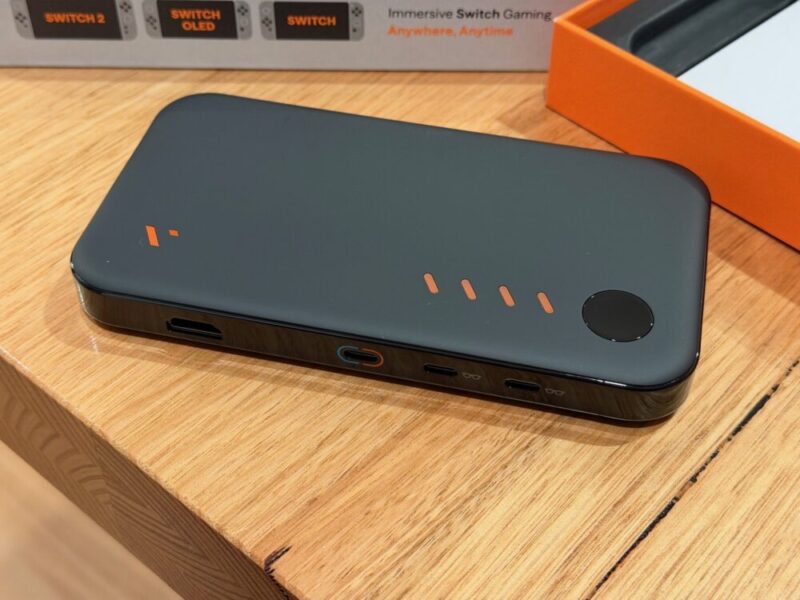
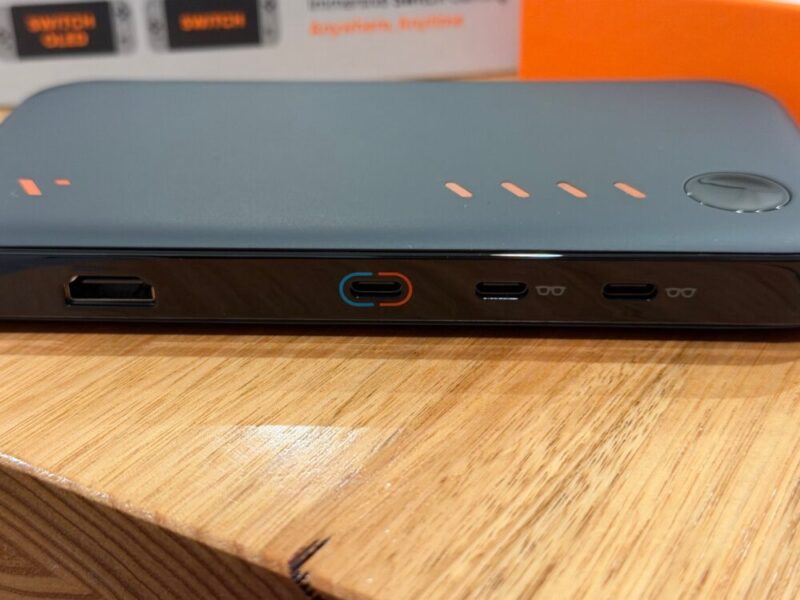
The dock itself provides 2 USB-C ports to connect up to 2 Viture XR glasses, complete with their own screen, a single USB-C port for the Nintendo Switch and a standard HDMI port beside that. Finally, there’s a power button on top of the device, and four lights that indicate a rough percentage of the battery life of the dock itself.
Using the cable that comes with the Pro 2 glasses is fine, but the cable provided with the dock is incredibly short, meaning whatever you’re connecting to it needs to sit right beside it. Even then, the 1 metre USB-C cable that comes with the glasses means you also have to sit close to the dock. The 13,000 mAh battery also acts as a power bank and can give you up to 20 hours with general HDMI devices, although the battery life does drop down to 8 hours with the Nintendo Switch, and 4 hours with something a little more demanding like the Steam Deck.
Much like the glasses, though, it’s incredibly easy to use, and connectivity feels relatively straightforward, without the need for any software support or pre-configured settings. Simply plug in, power on the dock and play. While you can use the glasses themselves to work around things like remote play for gaming consoles, the dock does feel relatively important and almost essential for console gamers, no matter the platform.
While using your phone is fine, there’s so much more you’re able to unlock with the Pro Mobile Dock that I would argue it justifies its A$269 price tag, if you’re using the glasses themselves regularly.
Verdict & Value
Overall, the Viture Pro 2 XR Glasses are an incredible investment that benefits not only those looking for portability and convenience, but also those looking for a much larger screen to use around the home. The 146-inch Sony Micro-OLED display is fantastic, complemented by its easy setup and support for those with nearsightedness.
The Viture Pro Mobile Dock also feels just as important for those looking to get a little more out of the experience, mainly for those with gaming consoles, but I would argue that the glasses on their own, for what is now considered an entry-level option, absolutely knock it out of the park.


FOUR AND A HALF STARS (OUT OF FIVE)
Highlights: Fantastic display; Comfortable to wear; Easy to set up; Great motion and clarity; Easily adjustable for those with nearsightedness or farsightedness
Lowlights: Speakers aren’t great and cause sound leakage; Software feels a little pointless when connected to your phone
Manufacturer: Viture
Price: A$629 (additional A$269 for Viture Pro Mobile Dock)
Available: Now available via the official Viture website and Amazon.
Review based on unit provided by Viture.
