

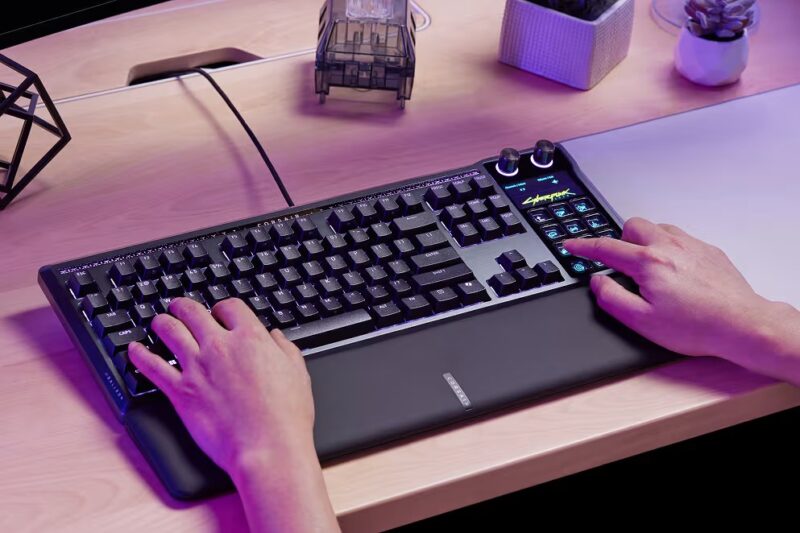
I feel like I’m always talking about how the list of gaming keyboards is growing daily, but it’s not every day you get to talk about how they’re helping revolutionise workflows and gaming sessions alike.
Enter the Corsair Galleon 100 SD Stream Deck-Integrated Mechanical Keyboard. Now that’s a mouthful to say, but it’s actually doing just as much. If it wasn’t already a premium and well-built gaming keyboard, it’s now adding the versatility of a Stream Deck, which can be customised to suit your daily needs, be it accessing shortcuts and commands across various games, or simply adding additional controls and shortcuts to help you work more efficiently.
Now this review might flow and feel a little differently compared to my past reviews. I’ll do my best to remain clear and concise about just how good this keyboard is, because there’s really no denying that. But after using this for a few weeks, I can’t get past a few burning questions in my head.
Who is this for? If you already own a decent gaming keyboard, should you just buy a Stream Deck? If you actually have the whopping A$599 to spend on such accessories, could you not just buy a decent gaming keyboard and a Stream Deck separately?
Let’s dive in and discuss.
Design
From a design perspective, the Corsair Galleon 100 SD ticks all the boxes. It’s a full sized-keyobard, with an aluminium top and a plastic bottom, and an integrated Stream Deck fitting in place of a dedicated number pad. With all that in mind, it rarely feels big and bulky. The only real issue I have is how it’s described as a full-sized keyboard, because it all comes down to how you utilise the Stream Deck on the right-hand side.
You’ve got standard arrow and function keys in between, but if you’re not using the Stream Deck as a number pad, it then becomes a TKL gaming keyboard. Once again, just something that stuck out to me over the past few weeks. The Stream Deck itself is really nice. The glossy buttons look fantastic, and the two customisable dials, dedicated IPS screen and 12 buttons go a long way in making this look and feel like an official Stream Deck, although we’ll touch on this a little later.
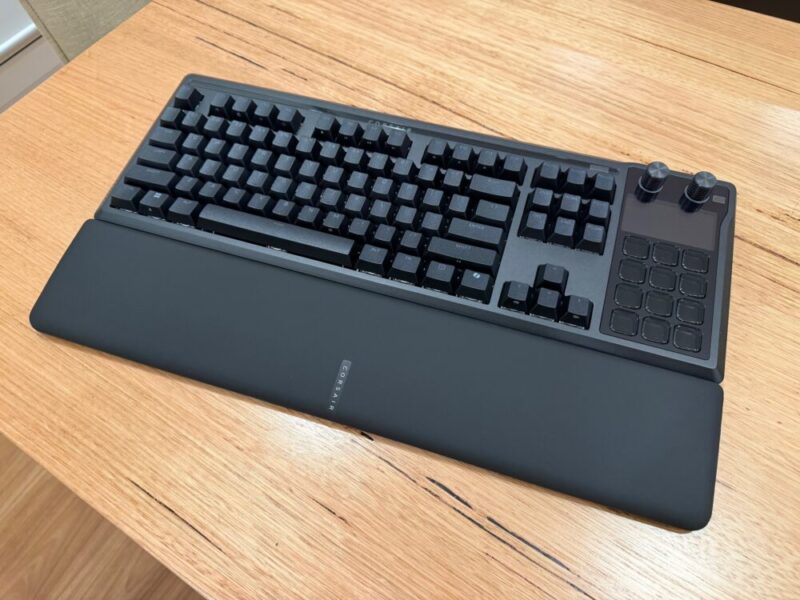
The per-key RGB effects look fantastic when this thing is up and running, and the lighting effects really pop across the top of the keyboard throughout the Corsair logo, and blend nicely with the integrated Stream Deck and all-black foundation. The magnetic detachable leatherette wrist rest is also a dream to use, with memory foam cushioning that makes typing and gaming a breeze as the hours fly by.
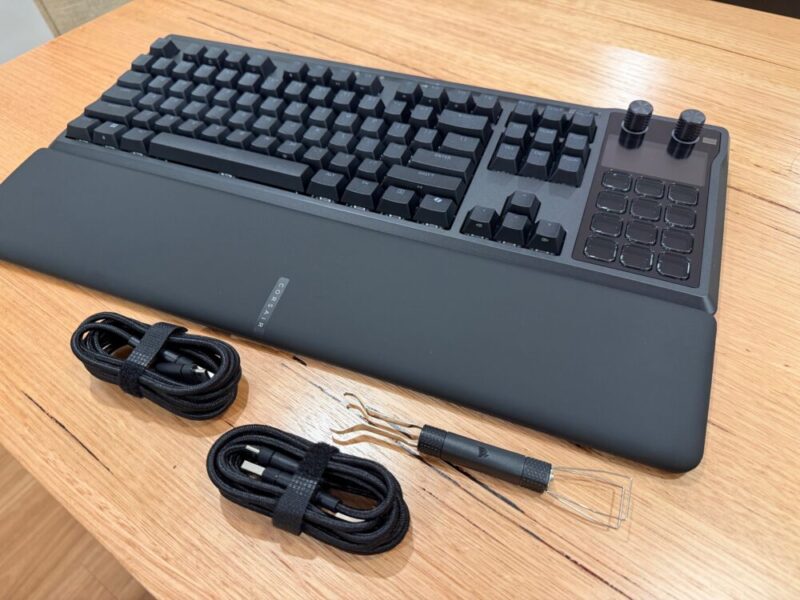
Out of the box, aside from the keyboard and wrist rest, you’ll also get two USB-A to USB-C cables and a 2-in-1 keycap and switch puller, which feels par for the course and is included in most of Corsair’s premium mechanical gaming keyboards.
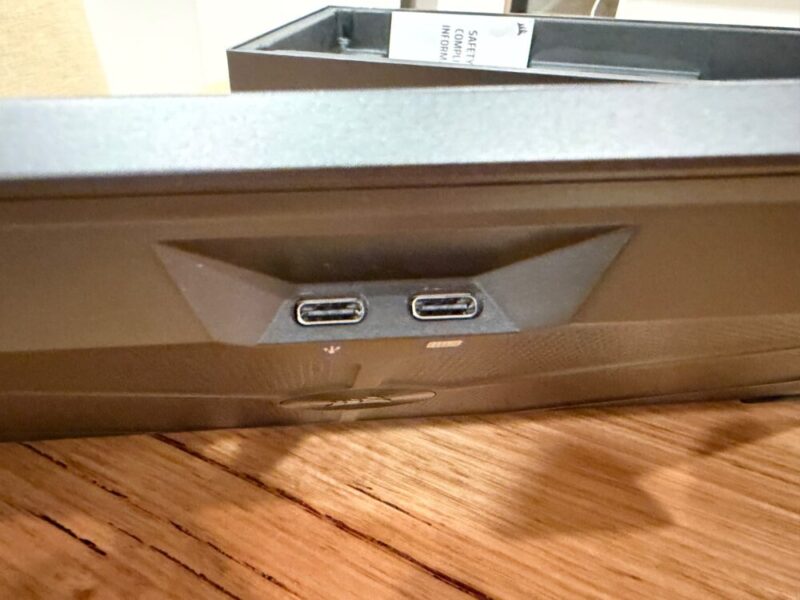
Around the back of the keyboard, however, you’ll find three USB-C ports, all of which serve a different purpose. Right under the keyboard in the centre, you’ll see two USB-C ports, one of which connects the keyboard itself to your PC, while the second acts as an upstream port for data and power, seemingly to help with the Stream Deck. This will take up a couple of USB-A ports on your PC, but you will get that USB-C port back on the keyboard for anything else you might want to plug in.
Performance
The Corsair Galleon 100 SD comes equipped with pre-lubed MLX Pulse (or purple) Linear switches with hotswap support, and they feel great to use. Pair that up with a polling rate of up to 8,000 Hz, and you’re getting some of the smoothest, most responsive linear keys on the market. I’m not sure why this ships with a 1,000 Hz polling rate, but it can be adjusted via the Corsair Web Hub App.
Not to mention the 45g actuation force and 2.0mm actuation distance of the keys, making for a total 3.6mm of travel. The matte finish keys also feel great for everyday use, and you can really feel the six layers of sound-dampening foam, which rid the keyboard of any unnecessary creaks.
While Hall Effect switches of the Vanguard 96 Pro do give users access to the RapidTrigger feature, which instantly resets the keys as they rise, I can’t really see it as a dealbreaker for daily gamers, given the minimal travel of these MLX Pulse Linear switches.
I’ve already had a fair amount of time wth them as they’re also included in the standard Vanguard 96 keyboard, and still stand as some of the best I’ve used. I would love to see how much this keyboard would cost if they did include those Hall Effect switches, but I digress.
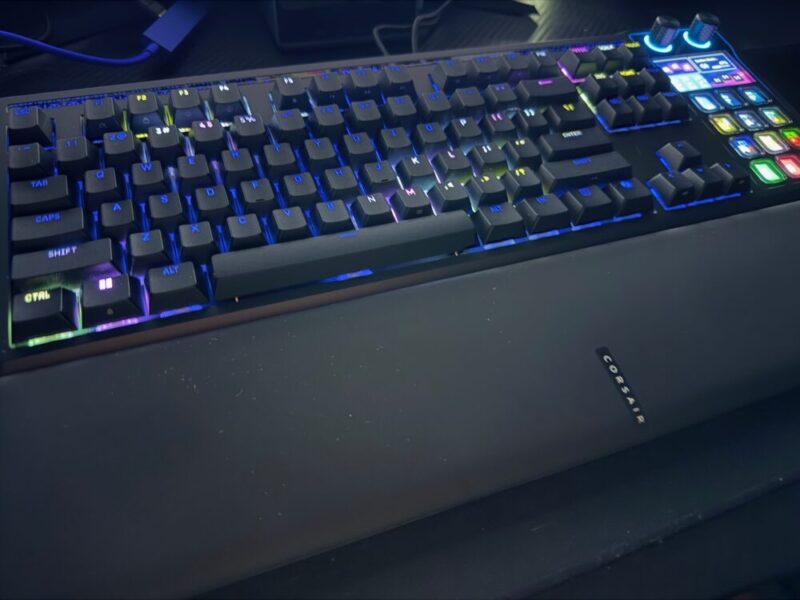
I can’t really see anyone wanting to hotswap these decent switches unless you really couldn’t stand them, but then I would really question if this keyboard was made for you in the first place. I don’t mean to downplay the performance of the Galleon 100 SD, because it really is fantastic.
But as it feels tied to the Stream Deck, I started weighing up my options. For example, could I just buy the Vanguard 96 Pro keyboard at A$349 for those top-tier Hall Effect switches, and then just invest in an Elgato Stream Deck MK.2 for A$239? If you’re looking to save on desk space, then sure, this makes more sense, but as this is already taking up two USB-A ports on my PC, the logistics begin to shift a little in my mind.
Overall, this is a fantastic keyboard that still feels top-notch for both typing and gaming. Once you enable that 8,000 Hz polling rate, this really is one of the better gaming keyboards I’ve had the pleasure of using.
Stream Deck
The dedicated Stream Deck is definitely a fantastic idea, and for the most part, it’s a joy to use for everyday workflow and hardcore gaming alike. The 12 buttons can be adjusted on the fly, thanks to a dedicated dial on the top of the Stream Deck, which changes the layout instantly. Be it a standard number pad, links to your favourite apps, or simply for small widgets like the weather, or CPU and RAM usage, the sky really is the limit.
Of course, you can upload various profiles via the Stream Deck app, and while there’s a little messing around to begin with, you can really get the most out of this, akin to an actual Stream Deck. You’ll have to head to the Stream Deck website to download the software, used seperately to the Corsair Web Hub App, but the Stream Deck software picks this up after installing a small profile, and adjustments are as easy as dragging and dropping additional buttons and commands onto that particular profile.
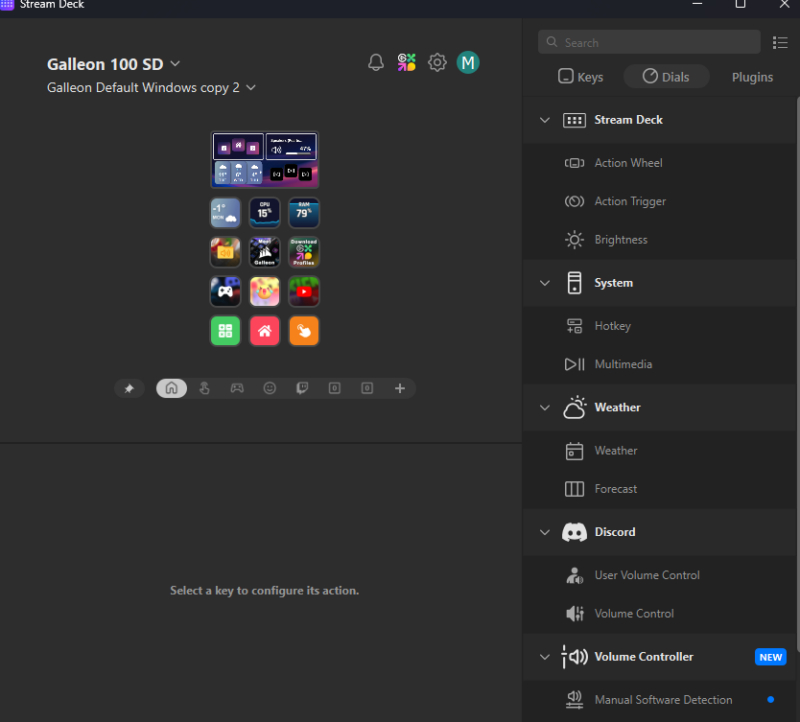
Part of me wishes they integrated this experience into the standard Corsair Web Hub App, but it’s not the end of the world.
The Stream Deck works a treat, but it only really goes as far as you need it to. I found myself switching between the number pad and a layout of various app shortcuts on the fly, but it’s also a great way to program commands from certain games, be it weapon loadouts, classes, or special abilities, enabling more room for you to utilise and customise standard keys. Each of the 12 face buttons is bright and vibrant, and easy enough to visually identify when mixed in with each other.
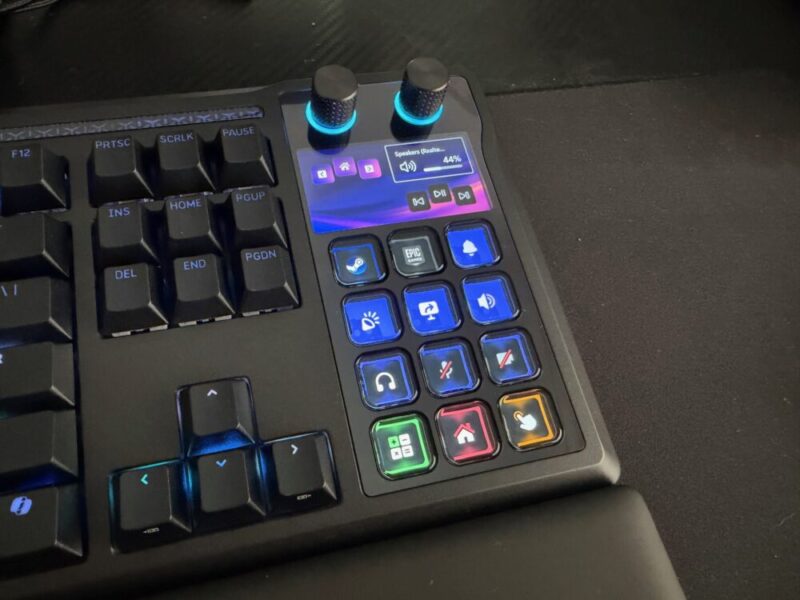
That being said, I wanted to discuss what it actually means to own a Stream Deck, as its usage can vary drastically, depending on your current setup. If you own the Elgato Stream Deck MK.2, for example, I would pass on this and instead look for a dedicated gaming keyboard.
But if you’re using something like the Stream Deck Mini or Stream Deck Neo, you might get a little more out of this if you’re looking to upgrade your keyboard in the process.
Software
I’m going to take a small excerpt from our Corsair Vanguard 96 gaming keyboard review, as we believe it applies here:
“Corsair’s Web Hub App is not actually compulsory, but definitely recommended if you want to get the most out of the overall experience. Unlike other brands, this software is accessed via the web directly, instead of being installed directly on your PC. It’s easy enough to access, and you can also store a dedicated shortcut on your desktop.”
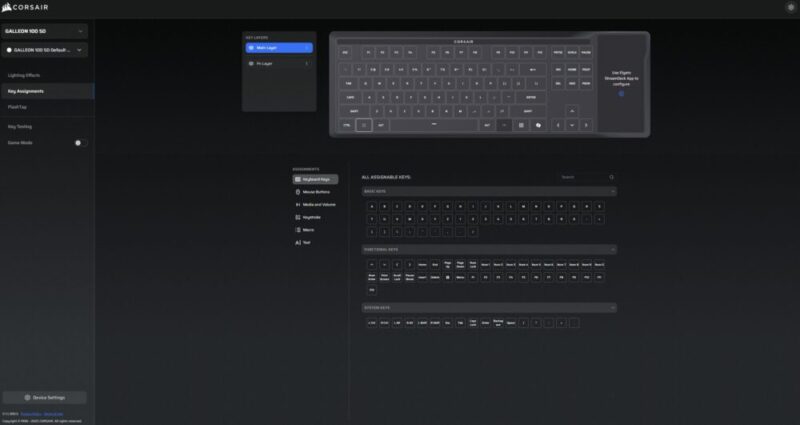
Using the software also feels the same here, as you have access to polling rates, per-key RGB lighting options and even macro commands on the fly.
The only issue I had with the software was that it didn’t register the keyboard properly until I completed the initial firmware update, and even then, it deactivated the keyboard when I tried to turn off the default theme to adjust things like RGB lighting. For some reason, the keyboard wouldn’t respond until I unplugged it and plugged it back in. I’m happy to chalk that up to a software glitch, but it was definitely frustrating at first.
Finally, I will also add here that the Galleon 100 SD is also compatible with consoles like the PlayStation 4/5 and Xbox Series X/S, although no software is required to switch between platforms. Instead, you’ll need to hold the Windows and FN keys for 5 seconds to switch back and forth.
Verdict & Value
Overall, the Corsair Galleon 100 SD Stream Deck-Integrated Mechanical Keyboard is a fantastic, premium, multifaceted keyboard for both hardcore gamers and everyday users alike. The integrated Stream Deck is infinitely customisable and improves general workflows and gaming sessions, enhancing its value.
But that is the ultimate question it poses, by asking what that value means to you. If you need a new keyboard and want a Stream Deck, you can’t really go wrong. But the second you own a Stream Deck or have a decent mechanical keyboard, it becomes a little harder to recommend, especially for the premium price tag.
Even then, it’s hard to deny just how good this feels, once it’s up and running.


FOUR STARS (OUT OF FIVE)
Highlights: Solid build quality; Fantastic keys, and the Stream Deck works incredibly well
Lowlights: One of the more expensive consumer gaming keyboards you can buy; Aimed at a very specific target audience that needs both a gaming keyboard and a Stream Deck
Manufacturer: Corsair
Price: A$599
Available: 28 February, 2026
Review based on unit supplied by Corsair, and will be available via JB Hi-Fi at launch.
Featured header image provided by Corsair.
