

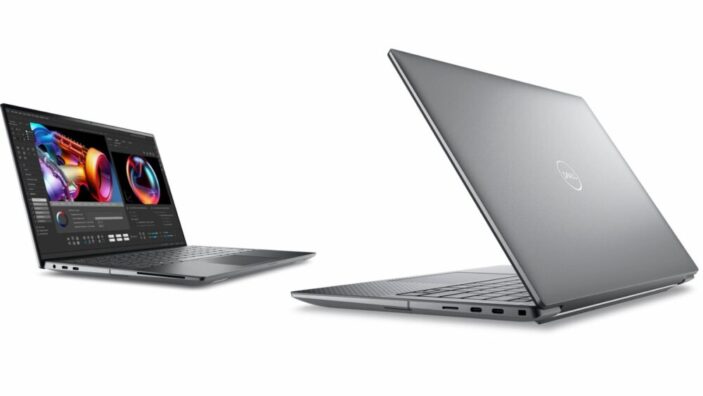
We all put more weight on vastly different things when it comes to a laptop that’s geared primarily towards productivity.
An ergonomic and responsive keyboard is a must (and it’s not as common as we’d like to think). A superior graphics card is front-and-centre for modern content creators and traditional designers. Long battery life is essential for remote workers. Brightness matters as well, but not as much as what’s under the hood.
I’ve personally been through countless portable workstations in the past. Microsoft used to be my go-to, but the company could never get their charging ports right so I switched on over to Dell recently. This model, the Precision 5490, came highly recommended by multiple tech writers and colleagues and so below you’ll find my thoughts based on a month with the laptop.
For clarity, there is a large number of configurations for the Dell Precision 5490, with a wide range of specs so workers – particularly office workers (it is a commercial device after all) – can find the style that best suits them and their workloads.
My model has an Intel Core Ultra 7 165H, but you can get the same with up to an Intel Core Ultra 9 185H. It being a commercial device, the price should be negotiated (carefully) with a Dell salesperson. But in general, you’re likely looking around the $4,500 mark.
It’s not a cheap laptop, but this isn’t cheap performance either. And it didn’t take me long before I could see the unquestionable value Dell are providing this year with its refocused range of releases.
Multiple online reviews are claiming this is the best-of-the-best when it comes to portable, 14-inch workstations. I’m inclined to agree, but there a few shortcomings I’d like to see addressed in a follow-up (although the only real dealbreaker is the built-in webcam).
Specs – At A Glance
As above, this particular Dell laptop comes in several configurations. You can fully customise the laptop when you order it online from the official Dell website.
- Processor: Intel Core Ultra 7 165H up to Intel Core Ultra 9 185H
- Graphics: Intel Arc Graphics or NVIDIA RTX 2000 Ada (4GB)
- RAM: 8GB to 64GB DDR5 5600MHz
- Storage: 256GB to 4TB PCIe NVMe SSD
- Display: 14″ 1920 x 1200 or 2560 x 1600 touch display options
- Battery: 54Whr or 72Whr options
Design
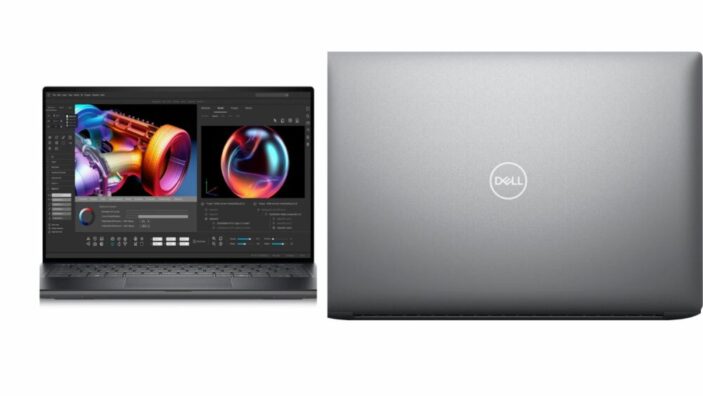
Dell has always been a reliable name for build quality. The silver chassis here is no exception at all. While the size has been tempered for a significantly more compact body, it still feels sturdy, durable and professional-grade.
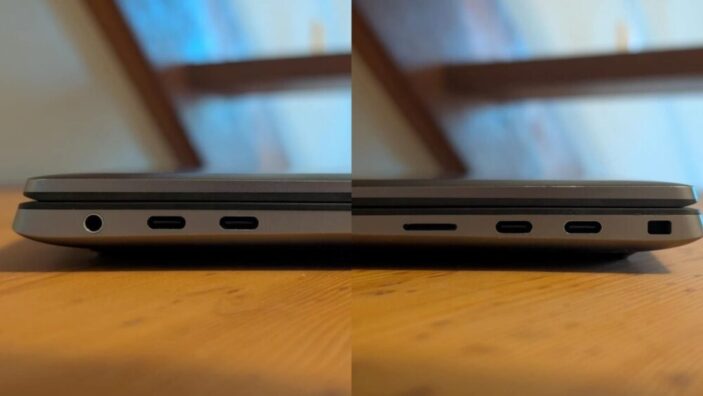
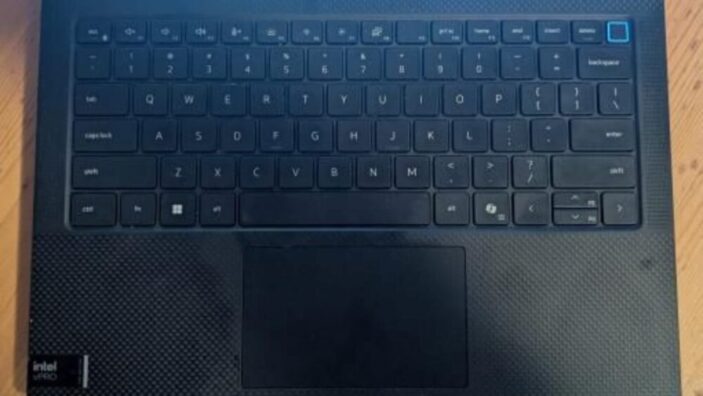
The aluminum chassis feels solid with minimal flex, and the carbon fiber keyboard deck adds both strength and a premium feel. Port selection is practical for modern professional use, but limited unless you’re using an external adapter. You’ve got only four USB-C Thunderbolt 4 ports, an audio jack, as well as a Wedge lock slot. There are other optional slots to like a SmartCard reader and a MicroSD slot, but I’d rather more options since most of my hard drives have older cables.
Connection wise there’s Wi-Fi 7 and Bluetooth 5.4 wireless.
The compact design comes with trade-offs. The cooling vents require clear airflow so positioning is important. The comprehensive port layout is also loaded mostly on the right side, potentially cluttering the workspace for right-handed mouse users if they need to add several external devices.
The keyboard offers 1.5mm of key travel with good tactile feedback. I’ve never owned a laptop with a better typing experience outside of a Mac, so this is a strong tick in Dell’s direction if you want a Windows laptop for work.
Touchscreen works well and is exceptionally responsive, but fingerprints are common and noticeable.
One thing I didn’t expect to be noting was the audio quality. I’ve tested a few business laptops in my time, but the speakers have always completely fallen flat. The channels here can reach high volumes without sounding strained or distorted, with great clarity but rather thin low-end.
Display
A 14-inch display comes in two primary configurations. The base model’s 1920 x 1200 panel delivers 100% sRGB coverage and up to 400 nits of brightness, while the higher-end 2560 x 1600 touch display offers 100% DCI-P3 coverage with up to 500 nits of brightness.
My 400 nits are fine for office use. I would prefer something a bit brighter if I was using this outdoors, however, but glare management is fine in most cases. I’d also prefer smaller bezels, and while they aren’t nearly as thick as some competing models, there’s also thinner on the market.
Where the IPS panel excels is colour accuracy and contrast. This is an appropriately premium display with perfect contrast so anyone using this to stream content in 4K wouldn’t find any disappointment.
Whoever was in charge of the webcam let the team down, however. A 720p webcam in this price range feels like a massive oversight with poor picture quality. Which is a shame given the audio is so good.
Performance
While I don’t have any past experience with Dell laptops to compare this with, I did find this completely obliterates the latest Surface Laptop in terms of performance. The hard-working Intel Core Ultra processor is clearly doing some heavy lifting here, and benchmarks I can find point towards impressive results in both single and multi-core workloads.
As a writer, my workload isn’t as intensive as say a designer or an architect, but I’ve had zero issue powering through my day-to-day with multiple applications, tabs and programs running. I haven’t even had a whirr out of this thing, making me think the base model is more than enough for most workers. For the rest, push a bit higher and Dell will deliver.
Battery
Battery is another area where Dell excels. This isn’t the biggest battery I’ve contended with in a laptop of this size but my 54Whr is more than enough to get me at least 10 hours on a full charge. That number bumps up to around 12 hours if I’ve got various power saving techniques like turning the brightness down and not running such intensive programs.
It’s competitive in the market and a huge relief from me, a long-time Surface user.
Verdict
The price is premium but Dell provide more than enough to match the tag, which has become increasingly important when even successful businesses are starting to feel the crunch of the cost-of-living crisis. You want value, and you want something long-lasting. I believe Dell has delivered on both here, and have provided enough customisation options so workers can decide on what’s most important to them.
The only real confusing thing here is how compromised the webcam is, especially since a professional-grade laptop is almost always going to be used to work calls as well.
I’d say this is best targeted at professionals who travel for a work a lot and need a workstation that’s exceptionally portable while maintaining the sturdiness of something designed just for the office. That’s precisely the reason the Precision has me thinking Dell is the way forward for me now.


FOUR STARS (OUT OF FIVE)
Highlights: Exceptional build quality and keyboard; strong battery life; audio quality is shockingly good; great contrast on the display; high efficiency; portability.
Lowlights: Display could be brighter; outdated webcam.
Price: Varies based on configuration
